> ## Documentation Index
> Fetch the complete documentation index at: https://docs.tryearmark.com/llms.txt
> Use this file to discover all available pages before exploring further.

# Product updates

> Stay up to date with Earmark product updates, improvements, and bug fixes.

<Update label="May 8, 2026">
  ## Import transcripts you already have

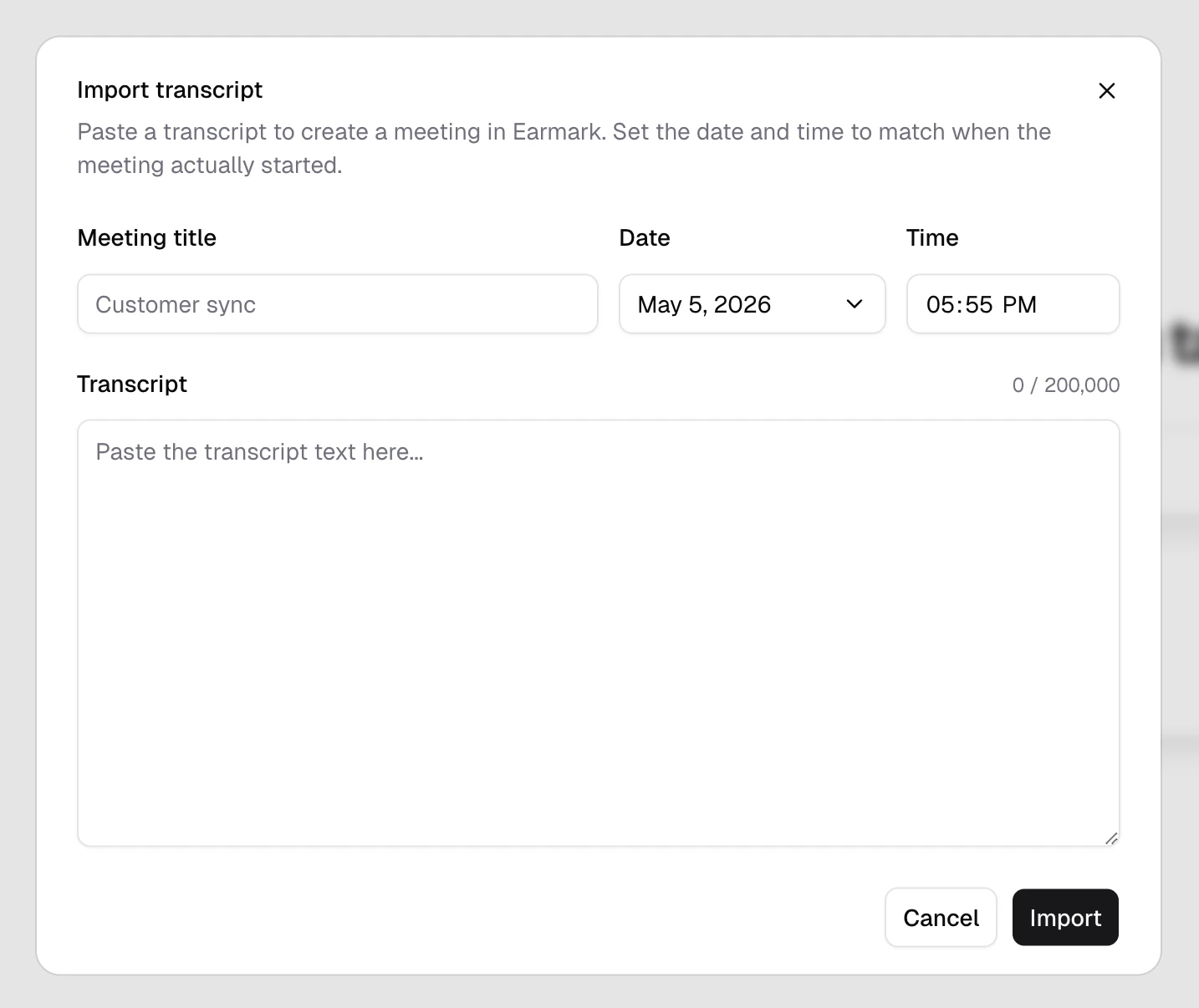
  You can now create an Earmark meeting from a transcript captured somewhere else. Open the header menu, choose `Import transcript`, add a title, set when the meeting happened, and paste the transcript. The imported meeting lands in your history at the date you picked, works with search, and accepts templates and artifacts like a recorded meeting. See [Import a transcript](/earmark-basics/transcript-import).

  <Frame>
    <div
      style={{
  backgroundImage: "url(https://mintcdn.com/earmark/vNkCE4NL0UOVgfZk/images/background-blue.png?fit=max&auto=format&n=vNkCE4NL0UOVgfZk&q=85&s=8d57271bb6e72c3715e83d97907c438b)",
  backgroundSize: "cover",
  backgroundPosition: "center",
  borderRadius: "1rem",
  padding: "4%",
}}
    >
      <div
        style={{
    borderRadius: "0.875rem",
    overflow: "hidden",
    boxShadow: "0 24px 60px rgba(15, 23, 42, 0.28)",
  }}
      >
        <img src="https://mintcdn.com/earmark/Ohit4WdElMgHzrzc/images/import-transcript.png?fit=max&auto=format&n=Ohit4WdElMgHzrzc&q=85&s=1d1d8254288907f83c9d38871eda40d7" alt="Import transcript dialog with fields for meeting title, date, time, and transcript text." style={{ width: "100%", display: "block" }} width="1434" height="1206" data-path="images/import-transcript.png" />
      </div>
    </div>
  </Frame>

  ## Composer is easier to discover

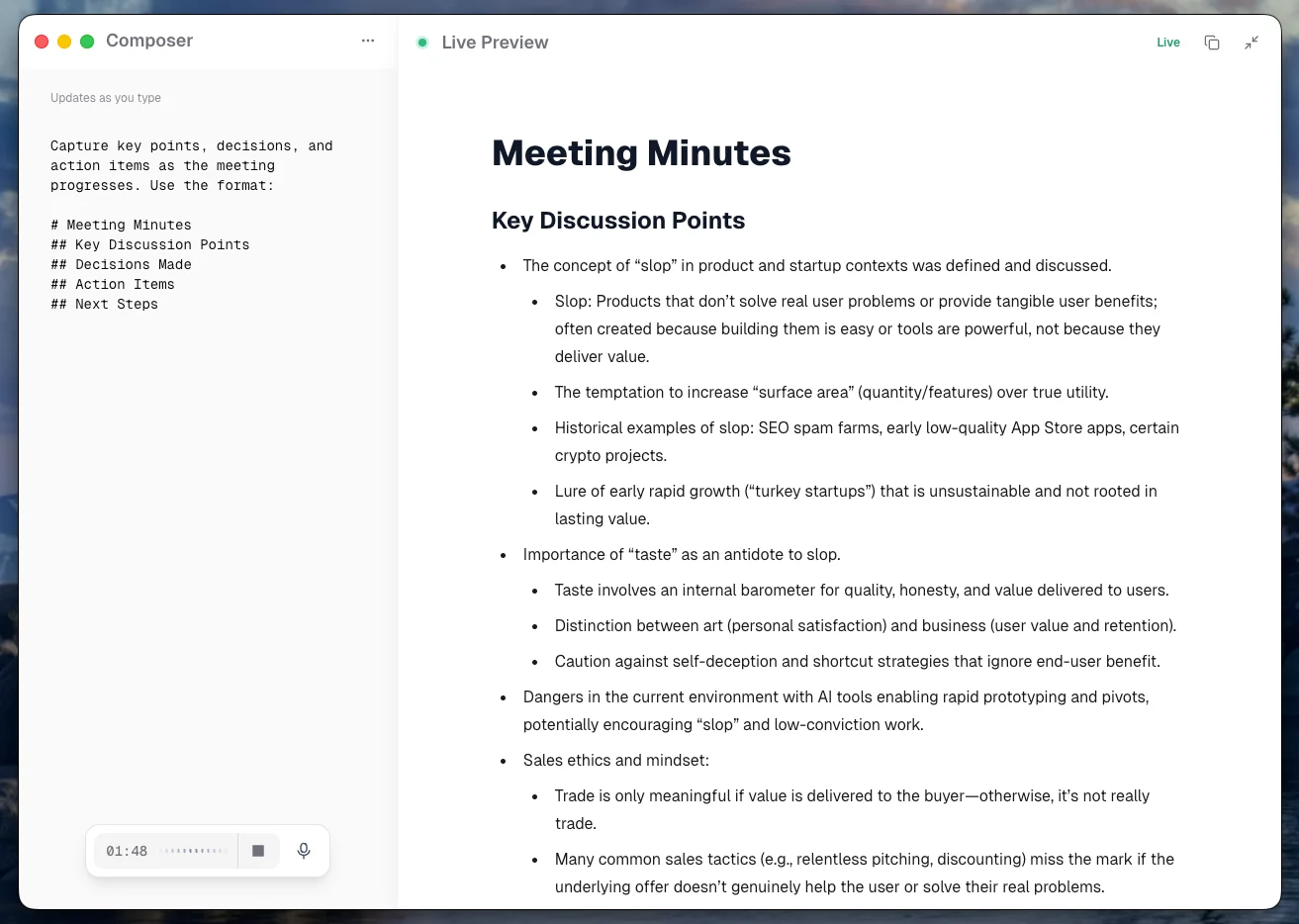
  New artifact cards can now point you toward Composer when a generated document is ready to refine. Inside Composer, a `Show me` tip types a practical example prompt, the preview updates as you type, and you can save a working prompt as a reusable template. See [Composer](/using-earmark/composer).

  <Frame>
    <div
      style={{
  backgroundImage: "url(https://mintcdn.com/earmark/vNkCE4NL0UOVgfZk/images/background-blue.png?fit=max&auto=format&n=vNkCE4NL0UOVgfZk&q=85&s=8d57271bb6e72c3715e83d97907c438b)",
  backgroundSize: "cover",
  backgroundPosition: "center",
  borderRadius: "1rem",
  padding: "4%",
}}
    >
      <div
        style={{
    borderRadius: "0.875rem",
    overflow: "hidden",
    boxShadow: "0 24px 60px rgba(15, 23, 42, 0.28)",
  }}
      >
        <img src="https://mintcdn.com/earmark/7bmTb55b6UAEQSbk/images/composer-view.png?fit=max&auto=format&n=7bmTb55b6UAEQSbk&q=85&s=0588a9116cef409c08fcda9ad693b792" alt="Composer view with prompt editing on the left and a live meeting-minutes preview on the right." style={{ width: "100%", display: "block" }} width="1313" height="934" data-path="images/composer-view.png" />
      </div>
    </div>
  </Frame>

  ## Toolbar capture controls

  The desktop toolbar can now do more without bringing the main window forward. Use `Quick Capture` for an ad-hoc recording, use `Stop Capture` while a recording is active, and click a `Coming up` meeting to open the call and start recording. On macOS, the menu bar countdown still shows what is next or currently running; on Windows, the tray icon now switches between idle and recording states. See [Earmark toolbar](/using-earmark/toolbar).

  <Frame caption="Start a recording with Quick Capture from the toolbar">
    <div
      style={{
  backgroundImage: "url(https://mintcdn.com/earmark/vNkCE4NL0UOVgfZk/images/background-blue.png?fit=max&auto=format&n=vNkCE4NL0UOVgfZk&q=85&s=8d57271bb6e72c3715e83d97907c438b)",
  backgroundSize: "cover",
  backgroundPosition: "center",
  borderRadius: "1rem",
  padding: "4%",
}}
    >
      <div
        style={{
    borderRadius: "0.875rem",
    overflow: "hidden",
    boxShadow: "0 24px 60px rgba(15, 23, 42, 0.28)",
  }}
      >
        <video autoPlay muted loop playsInline src="https://bwopjpjsyqjaz3ty.public.blob.vercel-storage.com/toolbar/toolbar-start.mp4" title="Quick Capture started from the Earmark toolbar menu." style={{ width: "100%", display: "block" }} />
      </div>
    </div>
  </Frame>

  ## Improvements

  * Desktop update checks now run quietly when the app opens or comes back into focus, so the sidebar `Update` badge is less likely to miss an available desktop update.
  * Delete confirmations now look consistent in dark mode.

  ## Bug fixes

  * Fixed Windows tray icons sometimes failing to switch into the right recording state after capture started or stopped.
  * Fixed cases where Windows could keep showing an older tray icon after an update.
</Update>

<Update label="May 1, 2026">
  ## Visual refresh across the app

  Earmark got a visual refresh! Buttons, cards, dialogs, and more all picked up refreshed styling, along with updated colors for better contrast and readability. Dark mode and high-density layouts get the same refresh.

  <Frame>
    <div
      style={{
  backgroundImage: "url(https://mintcdn.com/earmark/vNkCE4NL0UOVgfZk/images/background-blue.png?fit=max&auto=format&n=vNkCE4NL0UOVgfZk&q=85&s=8d57271bb6e72c3715e83d97907c438b)",
  backgroundSize: "cover",
  backgroundPosition: "center",
  borderRadius: "1rem",
  padding: "4%",
}}
    >
      <div
        style={{
    borderRadius: "0.875rem",
    overflow: "hidden",
    boxShadow: "0 24px 60px rgba(15, 23, 42, 0.28)",
  }}
      >
        <img src="https://mintcdn.com/earmark/aM6zQ3-NLsycphDq/images/ui-refresh.png?fit=max&auto=format&n=aM6zQ3-NLsycphDq&q=85&s=3ed3f5aeb683b22f32d2cbaf82a0b6ed" alt="Refreshed Earmark interface showing updated buttons, cards, and dialog styling with improved contrast." style={{ width: "100%", display: "block" }} width="3648" height="2230" data-path="images/ui-refresh.png" />
      </div>
    </div>
  </Frame>

  ## Onboarding got an overhaul

  The first-run flow now shows a live visual preview of the app alongside each step, so you can see Earmark take shape as you fill in your profile, workspace, and calendar. Forward navigation is also faster: each step prefetches only the next route you are likely to take instead of warming the whole flow up front.

  ## Improvements

  * The template picker empty state can now turn a missed search into a starting point: type a name that does not match anything and create a custom template draft seeded from your query.
  * Members settings role handling, action-menu states, and invite controls stay coherent after role edits and destructive actions, so the row you just acted on does not lag behind the change.
  * External documentation and marketing links now go through a shared component, so they consistently open in the system browser on desktop instead of inside the app window.

  ## Bug fixes

  * Fixed image cropping for profile photos and workspace logos so a failed upload rolls the preview back instead of leaving an unsaved image visible. Cropped output is also validated before replacing the avatar or logo, and oversized files are rejected before they overwrite the current one.
</Update>

<Update label="April 24, 2026">
  ## Meetings now generate a summary by default

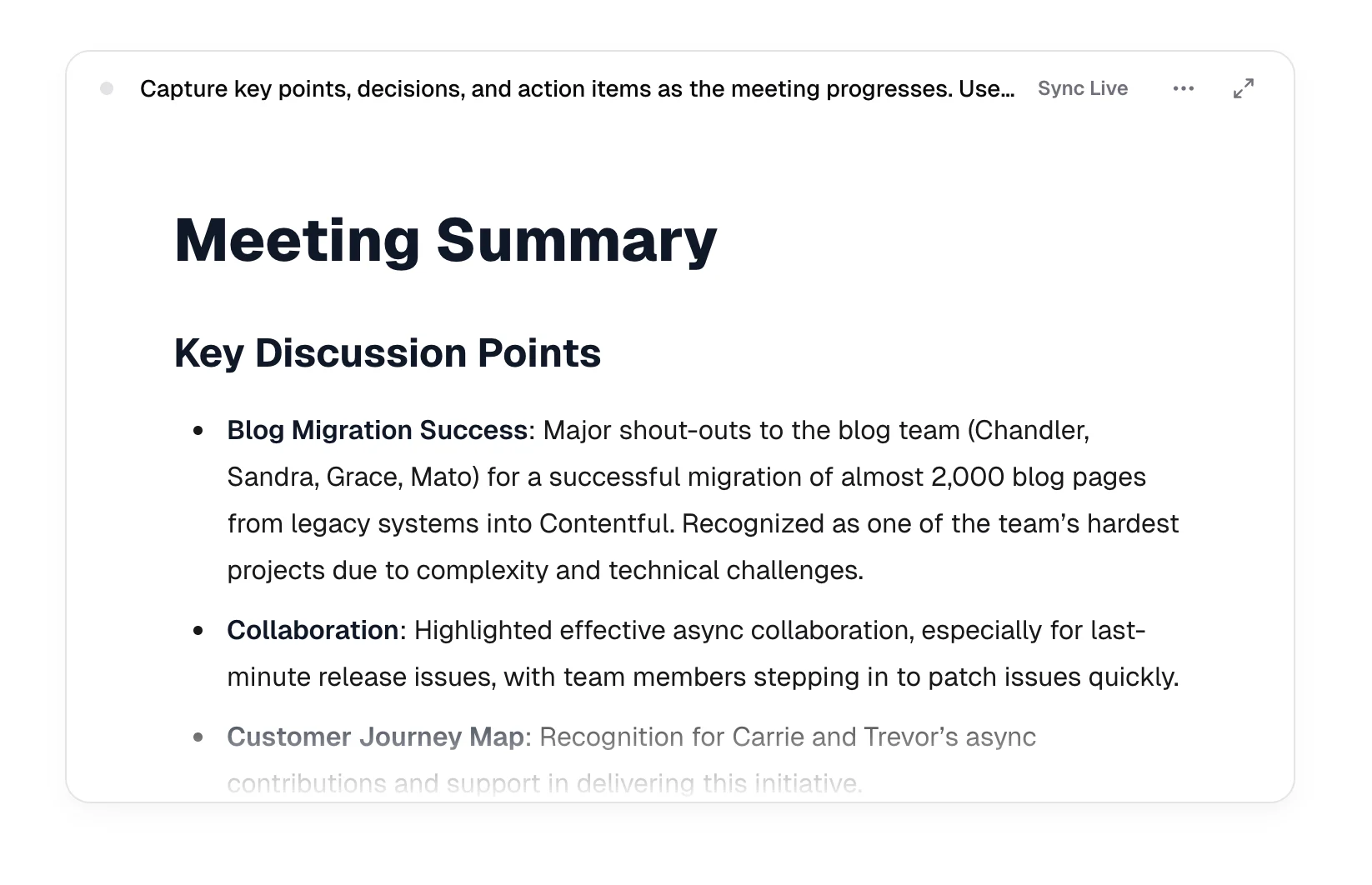
  When you stop a meeting for the first time, Earmark automatically creates a `Real-Time Meeting Summary and Action Items` task instead of leaving you to set one up by hand. Temporary meetings get the same default task locally, so meetings that stay off the record still produce a usable artifact. If you already added a summary task yourself, the automatic one is skipped. See [AI artifacts](/earmark-basics/artifacts).

  <Frame>
    <div
      style={{
  backgroundImage: "url(https://mintcdn.com/earmark/vNkCE4NL0UOVgfZk/images/background-blue.png?fit=max&auto=format&n=vNkCE4NL0UOVgfZk&q=85&s=8d57271bb6e72c3715e83d97907c438b)",
  backgroundSize: "cover",
  backgroundPosition: "center",
  borderRadius: "1rem",
  padding: "4%",
}}
    >
      <div
        style={{
    borderRadius: "0.875rem",
    overflow: "hidden",
    boxShadow: "0 24px 60px rgba(15, 23, 42, 0.28)",
  }}
      >
        <img src="https://mintcdn.com/earmark/aM6zQ3-NLsycphDq/images/meeting-summary.png?fit=max&auto=format&n=aM6zQ3-NLsycphDq&q=85&s=8a9aacbf71ac300e084bc3f43636e847" alt="Meeting workspace showing the auto-created Real-Time Meeting Summary and Action Items task after a meeting ends." style={{ width: "100%", display: "block" }} width="1646" height="1062" data-path="images/meeting-summary.png" />
      </div>
    </div>
  </Frame>

  ## Mobile fullscreen composer

  Tapping fullscreen on a task on mobile or smaller screen widths no longer hides the composer. The composer now lives in a left-side sheet that you can pull over the artifact to edit your prompt without leaving fullscreen. Drafts and update-as-you-type edits survive opening and closing the sheet, so a quick review does not cost you the prompt you were writing.

  ## Bug fixes

  * Fixed an intermittent issue where dismissing a desktop meeting notification could leave a transparent native window alive in the upper-right of the screen, intercepting clicks meant for other apps. Restarting Earmark used to be the only way to clear it; now the close path starts a one-second native teardown watchdog and immediately stops the window from receiving mouse events.
  * Fixed duplicate desktop update prompts. Shell updates and web client refreshes now share a single in-app `Update` badge in the sidebar, so you no longer see two competing prompts. If you are recording or in temporary mode, the action confirms before refreshing or restarting.
</Update>

<Update label="April 17, 2026">
  ## Bug fixes

  * Fixed copying a partial table selection (a single cell, row, or body range) producing blank or broken plain text in the clipboard. Full-table copies still produce the Slack-friendly key-value format.
  * Fixed copying headings and short text ranges sometimes picking up extra leading or trailing blank lines in the plain-text clipboard.
</Update>

<Update label="April 10, 2026">
  ## Calendar reconnect now reflects immediately in Settings

  Connecting or reconnecting a Google or Microsoft calendar from **Settings** now updates the UI right away on desktop. Previously, the connection would succeed in the background but Settings would stay in its pre-connect state until you closed and reopened the panel — and even then the calendar toggles could show the wrong provider's calendars. That mismatch is fixed. See [Connect your calendar](/getting-started/calendar).

  ## Bug fixes

  * Fixed Settings staying in a stale pre-connect state after returning from the desktop OAuth browser so the new connection is reflected without needing to close and reopen the panel.
  * Fixed calendar toggles sometimes showing the wrong provider's calendars after a reconnect by isolating Google and Microsoft calendar lists in separate cache entries.
  * Fixed the standalone connect dialog and the Settings calendar section so both react consistently when the app regains focus after the OAuth handoff.
</Update>

<Update label="April 3, 2026">
  ## Custom templates are live

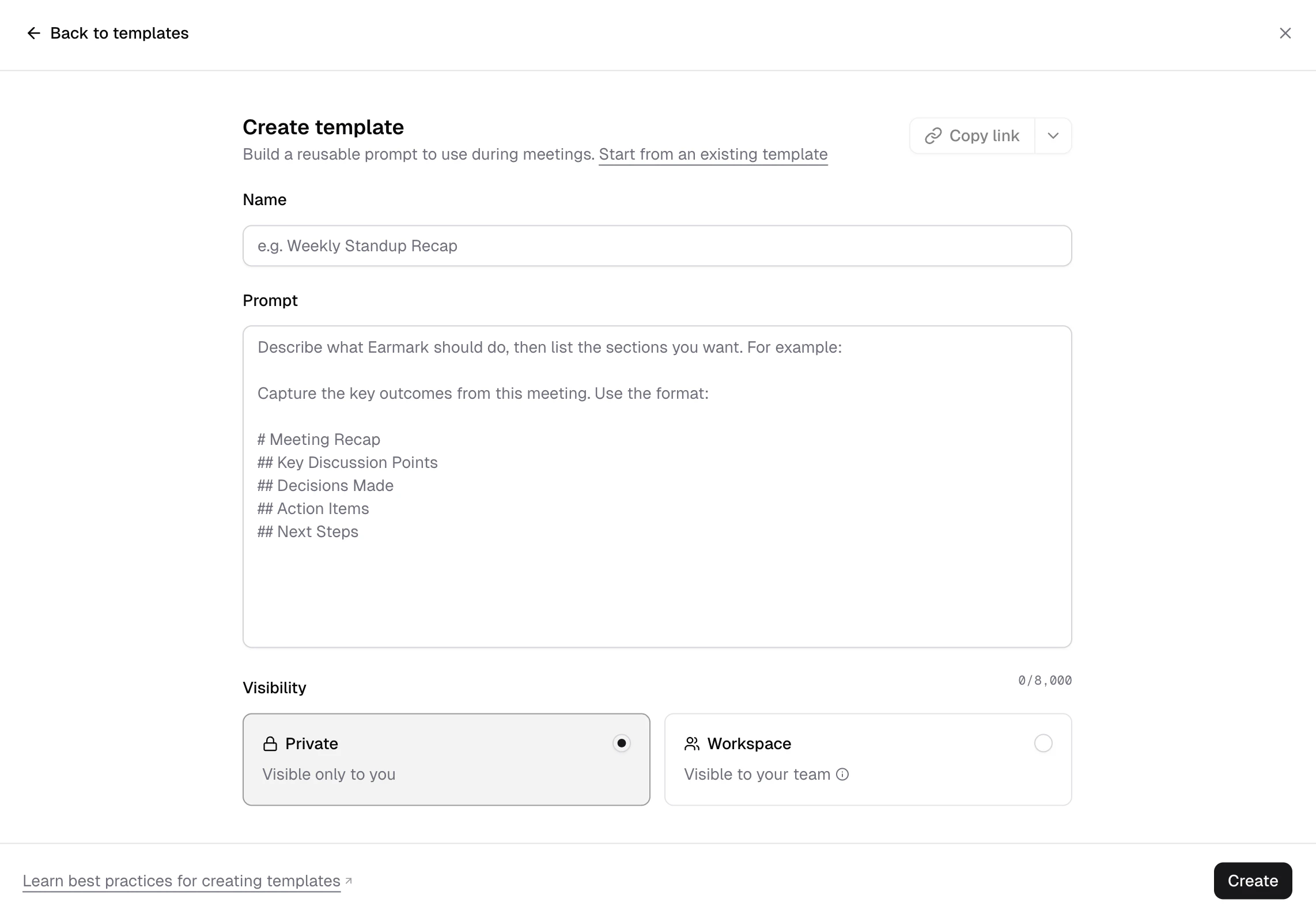
  You can now save reusable meeting prompts as `Custom templates`, either for yourself or for your workspace. Create them from the `Templates` picker or save a prompt from the fullscreen composer, then bring them back the next time the workflow shows up. Less prompt archaeology, more reuse. See [Custom templates](/customization/custom-templates).

  <Frame>
    <div
      style={{
  backgroundImage: "url(https://mintcdn.com/earmark/vNkCE4NL0UOVgfZk/images/background-blue.png?fit=max&auto=format&n=vNkCE4NL0UOVgfZk&q=85&s=8d57271bb6e72c3715e83d97907c438b)",
  backgroundSize: "cover",
  backgroundPosition: "center",
  borderRadius: "1rem",
  padding: "4%",
}}
    >
      <div
        style={{
    borderRadius: "0.875rem",
    overflow: "hidden",
    boxShadow: "0 24px 60px rgba(15, 23, 42, 0.28)",
  }}
      >
        <img src="https://mintcdn.com/earmark/DH1FY8S7HTtVfsNB/images/custom-templates.png?fit=max&auto=format&n=DH1FY8S7HTtVfsNB&q=85&s=8887bdbe759e56255389cbe1caeedd12" alt="Custom template creation flow showing a template name, prompt, visibility controls, and copy-link actions." style={{ width: "100%", display: "block" }} width="2284" height="1586" data-path="images/custom-templates.png" />
      </div>
    </div>
  </Frame>

  ## Use reusable prompts where the meeting work happens

  Custom templates now show up in the `Templates` picker and inline `/` suggestions, so recurring formats are easier to apply without rebuilding the prompt mid-meeting. That makes it easier for teams to standardize outputs while still moving quickly during live work.

  ## Share templates without rebuilding them

  `Copy link` now creates a live shared link that anyone with the link can open in the web app or desktop app. Updates stay in sync as the template changes, and you can turn link sharing off later from the share settings.

  ## Improvements

  * Shared template cards now show who created them, which makes team libraries easier to scan before you pick one.
  * Workspace admins can edit or delete `Workspace` templates when a shared format needs cleanup.
  * Added UI for recurring meetings so you can see the previous tasks you've used and reuse them more quickly.
</Update>

<Update label="March 27, 2026">
  ## Local transcript files landed on desktop

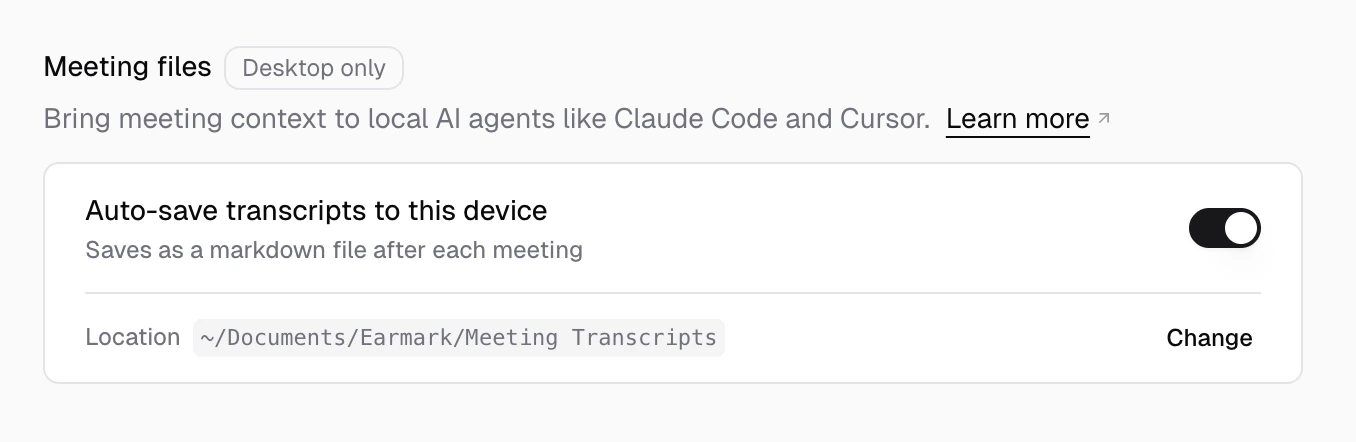
  Earmark can now auto-save each meeting as a local markdown file when the meeting ends, making it easier to bring meeting context into tools like Codex, Cursor, and other local AI workflows. This works for standard meetings and [temporary meetings](/earmark-basics/temporary-meetings). See [Local transcript files](/earmark-basics/local-transcripts).

  ## Choose where transcript files go

  Transcript file storage is controlled from **Settings > Personalization > Meeting files**, which lets you save local transcript files directly in the folders your local agent already uses. See [Local transcript files](/earmark-basics/local-transcripts).

  <Frame>
    <div
      style={{
  backgroundImage: "url(https://mintcdn.com/earmark/vNkCE4NL0UOVgfZk/images/background-blue.png?fit=max&auto=format&n=vNkCE4NL0UOVgfZk&q=85&s=8d57271bb6e72c3715e83d97907c438b)",
  backgroundSize: "cover",
  backgroundPosition: "center",
  borderRadius: "1rem",
  padding: "4%",
}}
    >
      <div
        style={{
    borderRadius: "0.875rem",
    overflow: "hidden",
    boxShadow: "0 24px 60px rgba(15, 23, 42, 0.28)",
  }}
      >
        <img src="https://mintcdn.com/earmark/d09fpHccGH4we3St/images/local-transcripts-settings.png?fit=max&auto=format&n=d09fpHccGH4we3St&q=85&s=20c7622276898058204b4e6b7e1f7741" alt="Settings panel for local transcript files showing the save-location picker row." style={{ width: "100%", display: "block" }} width="1356" height="442" data-path="images/local-transcripts-settings.png" />
      </div>
    </div>
  </Frame>

  ## Improvements

  * `Export open windows` now asks for a save location immediately on desktop instead of waiting until the export finishes collecting data.
  * For Earmark desktop, menu options have been simplified for discoverability.
</Update>

<Update label="March 20, 2026">
  ## Desktop browser handoffs got more reliable

  Returning from the browser to the Earmark desktop app is more dependable now, especially during sign-in and calendar connection flows. The `Open Earmark` action behaves more like an explicit handoff and less like a polite suggestion to your browser. See [Connect your calendar](/getting-started/calendar) and [Desktop deep linking](/troubleshooting/desktop-deep-linking).

  ## Bug fixes

  * Fixed the desktop sign-in return flow so clicking `Open Earmark` is more likely to reopen the app when the browser does not hand off automatically.
  * Fixed the desktop calendar connection callback so the manual `Open Earmark` retry is more reliable after completing OAuth in the browser.
</Update>

<Update label="March 13, 2026">
  ## Billing added to workspace settings

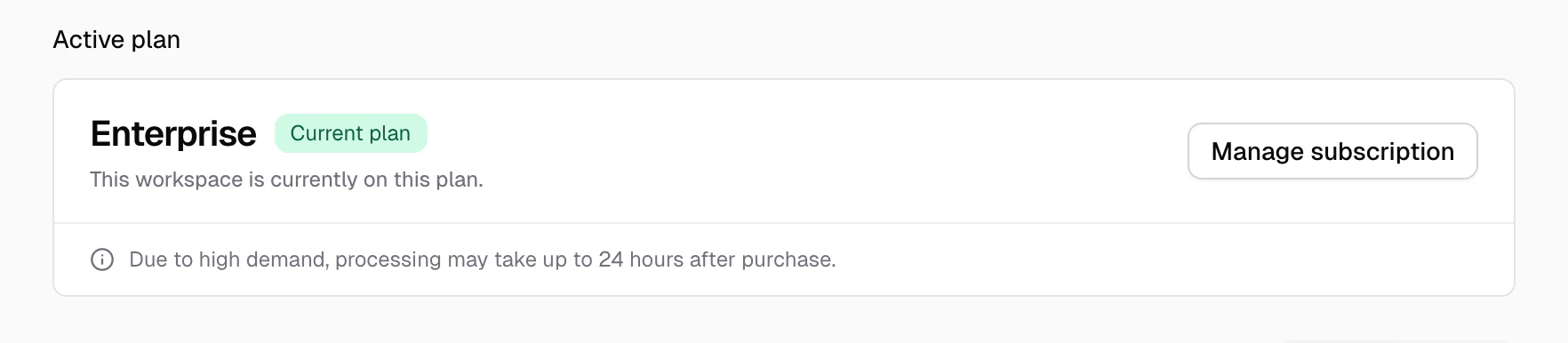
  Admins can now manage billing from `Settings > Billing` instead of bouncing between trial notices and external links. Less tab archaeology, more shipping. See [Workspaces](/earmark-basics/workspaces).

  <Frame>
    <div
      style={{
  backgroundImage: "url(https://mintcdn.com/earmark/vNkCE4NL0UOVgfZk/images/background-blue.png?fit=max&auto=format&n=vNkCE4NL0UOVgfZk&q=85&s=8d57271bb6e72c3715e83d97907c438b)",
  backgroundSize: "cover",
  backgroundPosition: "center",
  borderRadius: "1rem",
  padding: "4%",
}}
    >
      <div
        style={{
    borderRadius: "0.875rem",
    overflow: "hidden",
    boxShadow: "0 24px 60px rgba(15, 23, 42, 0.28)",
  }}
      >
        <img src="https://mintcdn.com/earmark/yzOav5JqFuTAaIx0/images/changelog/2026-03-13/billing.png?fit=max&auto=format&n=yzOav5JqFuTAaIx0&q=85&s=0b842869fb29759e27d9d9e2a5415206" alt="Settings > Billing showing the current plan summary and monthly/yearly plan cards." style={{ width: "100%", display: "block" }} data-og-width="1764" width="1764" data-og-height="386" height="386" data-path="images/changelog/2026-03-13/billing.png" data-optimize="true" data-opv="3" srcset="https://mintcdn.com/earmark/yzOav5JqFuTAaIx0/images/changelog/2026-03-13/billing.png?w=280&fit=max&auto=format&n=yzOav5JqFuTAaIx0&q=85&s=21471fef5095fc31346aab109992c458 280w, https://mintcdn.com/earmark/yzOav5JqFuTAaIx0/images/changelog/2026-03-13/billing.png?w=560&fit=max&auto=format&n=yzOav5JqFuTAaIx0&q=85&s=afedf46697725937d589b610d7188694 560w, https://mintcdn.com/earmark/yzOav5JqFuTAaIx0/images/changelog/2026-03-13/billing.png?w=840&fit=max&auto=format&n=yzOav5JqFuTAaIx0&q=85&s=61a01e6c23620df543f0324cdc9d22c7 840w, https://mintcdn.com/earmark/yzOav5JqFuTAaIx0/images/changelog/2026-03-13/billing.png?w=1100&fit=max&auto=format&n=yzOav5JqFuTAaIx0&q=85&s=36eccdad946a9378bde9af66dc2dbaa0 1100w, https://mintcdn.com/earmark/yzOav5JqFuTAaIx0/images/changelog/2026-03-13/billing.png?w=1650&fit=max&auto=format&n=yzOav5JqFuTAaIx0&q=85&s=221d369759cf3dcc4eca3fe187112d98 1650w, https://mintcdn.com/earmark/yzOav5JqFuTAaIx0/images/changelog/2026-03-13/billing.png?w=2500&fit=max&auto=format&n=yzOav5JqFuTAaIx0&q=85&s=0d0bab6f73831ef422ec56f0f7efd351 2500w" />
      </div>
    </div>
  </Frame>

  ## Desktop join and capture got more reliable

  Desktop notification and tray handoffs are more dependable now, especially around cold starts and first-click joins. Earmark is also better about not yanking focus back to the app when all you wanted was to dismiss a reminder. See [Calendar](/getting-started/calendar).

  ## Improvements

  * Added a `Billing` section in settings with plan visibility, trial status, and upgrade actions. One place instead of three.
  * Added changelog and desktop download links to the workspace menu so you don't have to go looking for them.
  * Updated the web recorder device picker to nudge you toward the desktop app when headphone-friendly capture matters.

  ## Bug fixes

  * Fixed dismissing desktop meeting notifications on macOS sometimes bringing the main app forward like an overhelpful intern.
  * Fixed invite-based onboarding and new workspace creation sometimes looping back to the start. Nobody should have to onboard twice.
  * Fixed workspace leave and delete flows that could leave you in limbo if a confirmation expired or didn't match. Limbo is not a feature.
  * Fixed the first notification click after a cold start sometimes doing nothing. It does something now.
  * Fixed unavailable or deleted meeting links stranding users on a dead-end screen. You now get sent home with an explanation instead of a blank stare.
</Update>

<Update label="March 6, 2026">
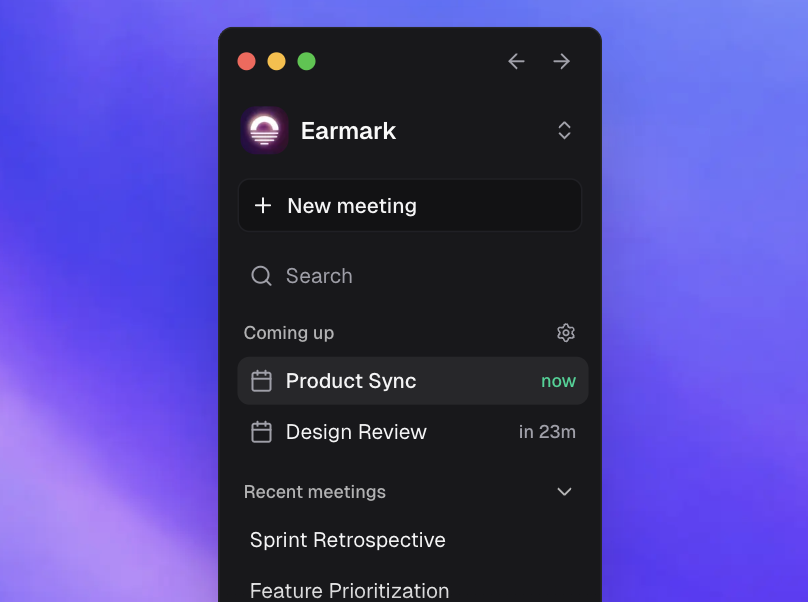
  <h2 style={{ fontSize: '20px', lineHeight: '1.4', fontWeight: 600 }}>Introducing Earmark 2.0</h2>

  <div style={{ margin: "0 0 1rem 0" }}>
    <Frame>
      <img src="https://mintcdn.com/earmark/vNkCE4NL0UOVgfZk/images/changelog/2026-03-06/sidebar.png?fit=max&auto=format&n=vNkCE4NL0UOVgfZk&q=85&s=3e145afc31066ea2fed3dcb82e8c3dc8" alt="Earmark 2.0 release image showing the dark mode Earmark app interface." style={{ width: "100%", display: "block" }} width="808" height="602" data-path="images/changelog/2026-03-06/sidebar.png" />
    </Frame>
  </div>

  <p style={{ fontSize: "14px", lineHeight: "1.7142857", margin: "0 0 1rem 0" }}>
    Your meetings are now saved automatically. One window. Every meeting. Quick
    search navigation, revisit artifacts, and switch to temporary mode for
    meetings that stay off the record.
  </p>

  <h2 style={{ fontSize: "20px", lineHeight: "1.4", fontWeight: 600 }}>
    One consolidated workspace
  </h2>

  <p style={{ fontSize: "14px", lineHeight: "1.7142857" }}>
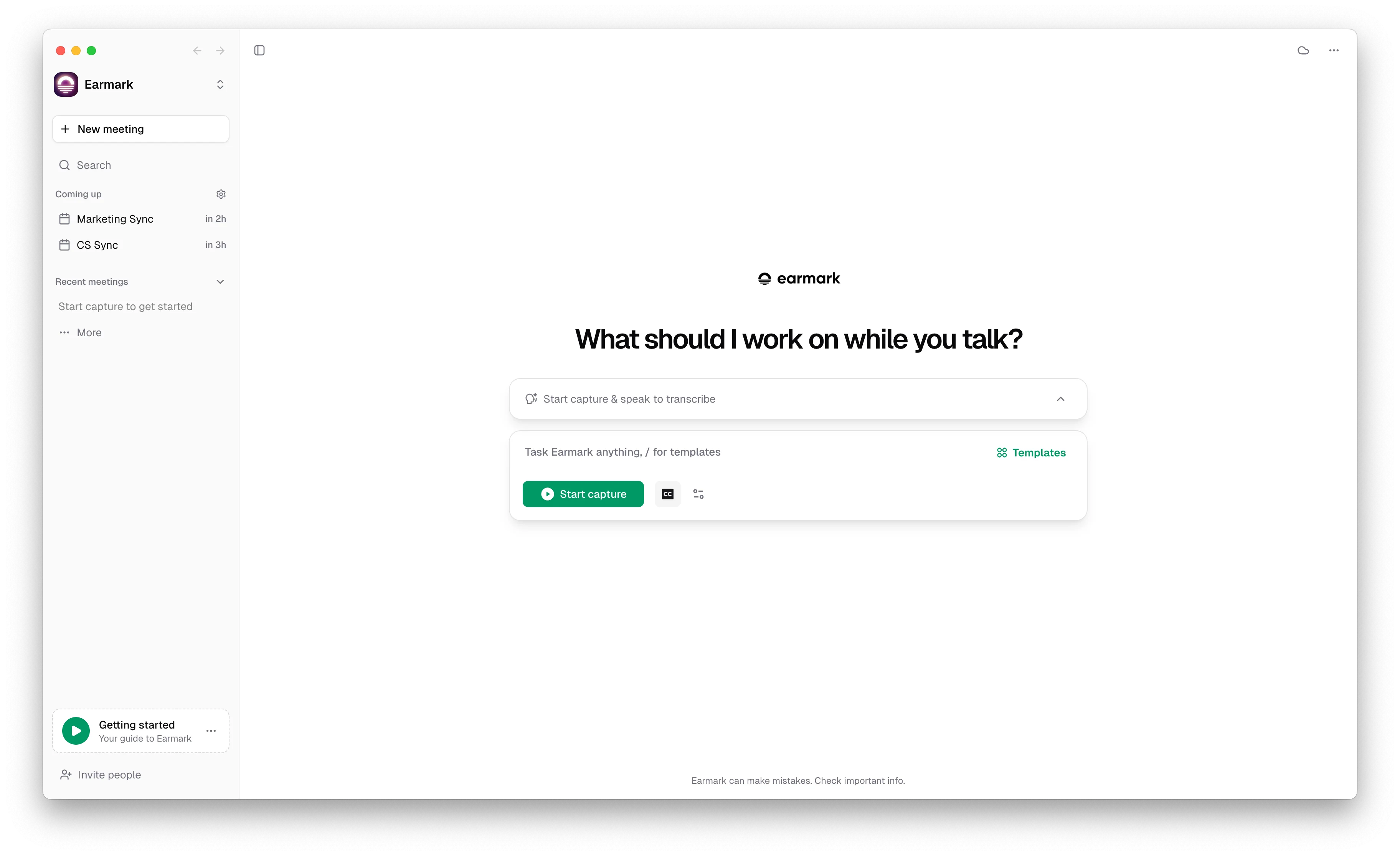
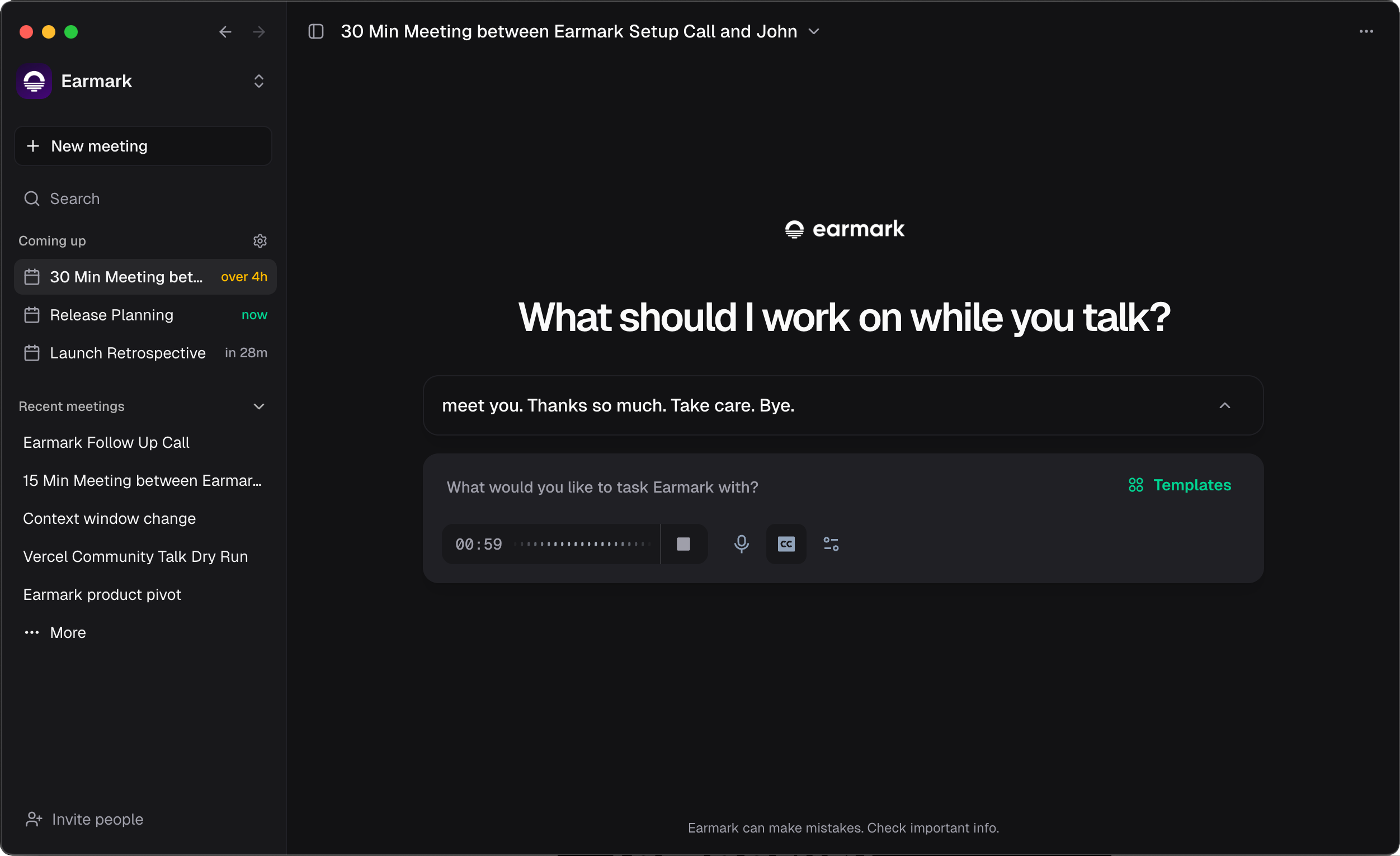
    Earmark now gives your day-to-day work a single home. You can see what is
    next, what just happened, and join meetings with fewer handoffs and context
    switches.
  </p>

  <Frame>
    <div
      style={{
  backgroundImage: "url(https://mintcdn.com/earmark/vNkCE4NL0UOVgfZk/images/background-blue.png?fit=max&auto=format&n=vNkCE4NL0UOVgfZk&q=85&s=8d57271bb6e72c3715e83d97907c438b)",
  backgroundSize: "cover",
  backgroundPosition: "center",
  borderRadius: "1rem",
  padding: "4%",
}}
    >
      <div
        style={{
    borderRadius: "0.875rem",
    overflow: "hidden",
    boxShadow: "0 24px 60px rgba(15, 23, 42, 0.28)",
  }}
      >
        <img src="https://mintcdn.com/earmark/vNkCE4NL0UOVgfZk/images/changelog/2026-03-06/workspace-overview.png?fit=max&auto=format&n=vNkCE4NL0UOVgfZk&q=85&s=156aaedaf9e217cfad6f4fe29c0171fb" alt="Earmark 2.0 workspace showing upcoming meetings, recent meetings, and live capture controls in a single window." style={{ width: "100%", display: "block" }} width="2503" height="1531" data-path="images/changelog/2026-03-06/workspace-overview.png" />
      </div>
    </div>
  </Frame>

  <h2 style={{ fontSize: "20px", lineHeight: "1.4", fontWeight: 600 }}>
    Meeting history that compounds
  </h2>

  <p style={{ fontSize: "14px", lineHeight: "1.7142857" }}>
    Work does not disappear when the call ends. Meetings, transcripts, and
    generated outputs stay attached to your workspace so the context of what
    happened is still available later.
  </p>

  <Frame>
    <div
      style={{
  backgroundImage: "url(https://mintcdn.com/earmark/vNkCE4NL0UOVgfZk/images/background-blue.png?fit=max&auto=format&n=vNkCE4NL0UOVgfZk&q=85&s=8d57271bb6e72c3715e83d97907c438b)",
  backgroundSize: "cover",
  backgroundPosition: "center",
  borderRadius: "1rem",
  padding: "4%",
}}
    >
      <div
        style={{
    borderRadius: "0.875rem",
    overflow: "hidden",
    boxShadow: "0 24px 60px rgba(15, 23, 42, 0.28)",
  }}
      >
        <img src="https://mintcdn.com/earmark/vNkCE4NL0UOVgfZk/images/changelog/2026-03-06/meeting-history.gif?s=fee96ea03e342ad3ceaf62f279399413" alt="Animated view of Earmark meeting history showing saved meetings and retained outputs." style={{ width: "100%", display: "block" }} width="1192" height="720" data-path="images/changelog/2026-03-06/meeting-history.gif" />
      </div>
    </div>
  </Frame>

  <h2 style={{ fontSize: "20px", lineHeight: "1.4", fontWeight: 600 }}>
    Control your data
  </h2>

  <p style={{ fontSize: "14px", lineHeight: "1.7142857" }}>
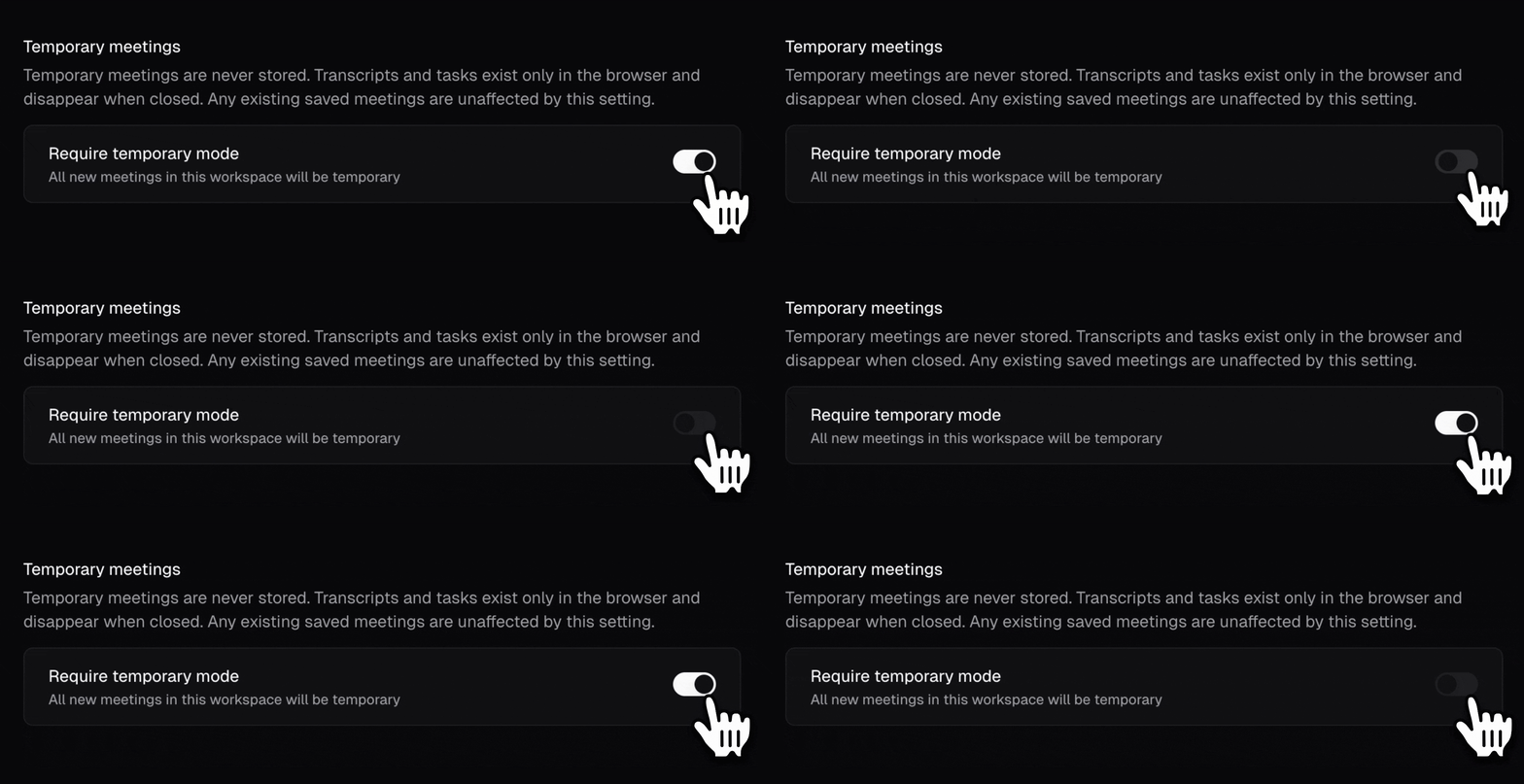
    You can now decide what gets retained per meeting or across a workspace. Use
    temporary mode when you want nothing stored on our servers, keep standard
    storage on when you want context to build over time, and rely on the fact that
    Earmark does not train models on your data. See [Temporary
    meetings](/earmark-basics/temporary-meetings) and [Security and
    privacy](/security-and-privacy) for the underlying policy details.
  </p>

  <Frame>
    <div
      style={{
  backgroundImage: "url(https://mintcdn.com/earmark/vNkCE4NL0UOVgfZk/images/background-blue.png?fit=max&auto=format&n=vNkCE4NL0UOVgfZk&q=85&s=8d57271bb6e72c3715e83d97907c438b)",
  backgroundSize: "cover",
  backgroundPosition: "center",
  borderRadius: "1rem",
  padding: "4%",
}}
    >
      <div
        style={{
    borderRadius: "0.875rem",
    overflow: "hidden",
    boxShadow: "0 24px 60px rgba(15, 23, 42, 0.28)",
  }}
      >
        <img src="https://mintcdn.com/earmark/vNkCE4NL0UOVgfZk/images/changelog/2026-03-06/data-controls.gif?s=59d0235a2aec8bc1b268860c223c9901" alt="Animated view of Earmark temporary meeting controls showing workspace-level retention settings." style={{ width: "100%", display: "block" }} width="2092" height="720" data-path="images/changelog/2026-03-06/data-controls.gif" />
      </div>
    </div>
  </Frame>

  <h2 style={{ fontSize: "20px", lineHeight: "1.4", fontWeight: 600 }}>
    Instant recall
  </h2>

  <p style={{ fontSize: "14px", lineHeight: "1.7142857" }}>
    Reopen any past meeting and pull its transcript and artifacts back into view
    in seconds, even while another meeting is live. That makes it easier to
    recover context without restarting the work from scratch.
  </p>

  <Frame>
    <div
      style={{
  backgroundImage: "url(https://mintcdn.com/earmark/vNkCE4NL0UOVgfZk/images/background-blue.png?fit=max&auto=format&n=vNkCE4NL0UOVgfZk&q=85&s=8d57271bb6e72c3715e83d97907c438b)",
  backgroundSize: "cover",
  backgroundPosition: "center",
  borderRadius: "1rem",
  padding: "4%",
}}
    >
      <div
        style={{
    borderRadius: "0.875rem",
    overflow: "hidden",
    boxShadow: "0 24px 60px rgba(15, 23, 42, 0.28)",
  }}
      >
        <img src="https://mintcdn.com/earmark/vNkCE4NL0UOVgfZk/images/changelog/2026-03-06/instant-recall.gif?s=c6bc4f426be35b096770789374a72497" alt="Animated view of reopening a previous Earmark meeting to recover transcript and artifact context." style={{ width: "100%", display: "block" }} width="688" height="480" data-path="images/changelog/2026-03-06/instant-recall.gif" />
      </div>
    </div>
  </Frame>

  <h2 style={{ fontSize: "20px", lineHeight: "1.4", fontWeight: 600 }}>
    Build with Cursor, v0, Linear, and Codex
  </h2>

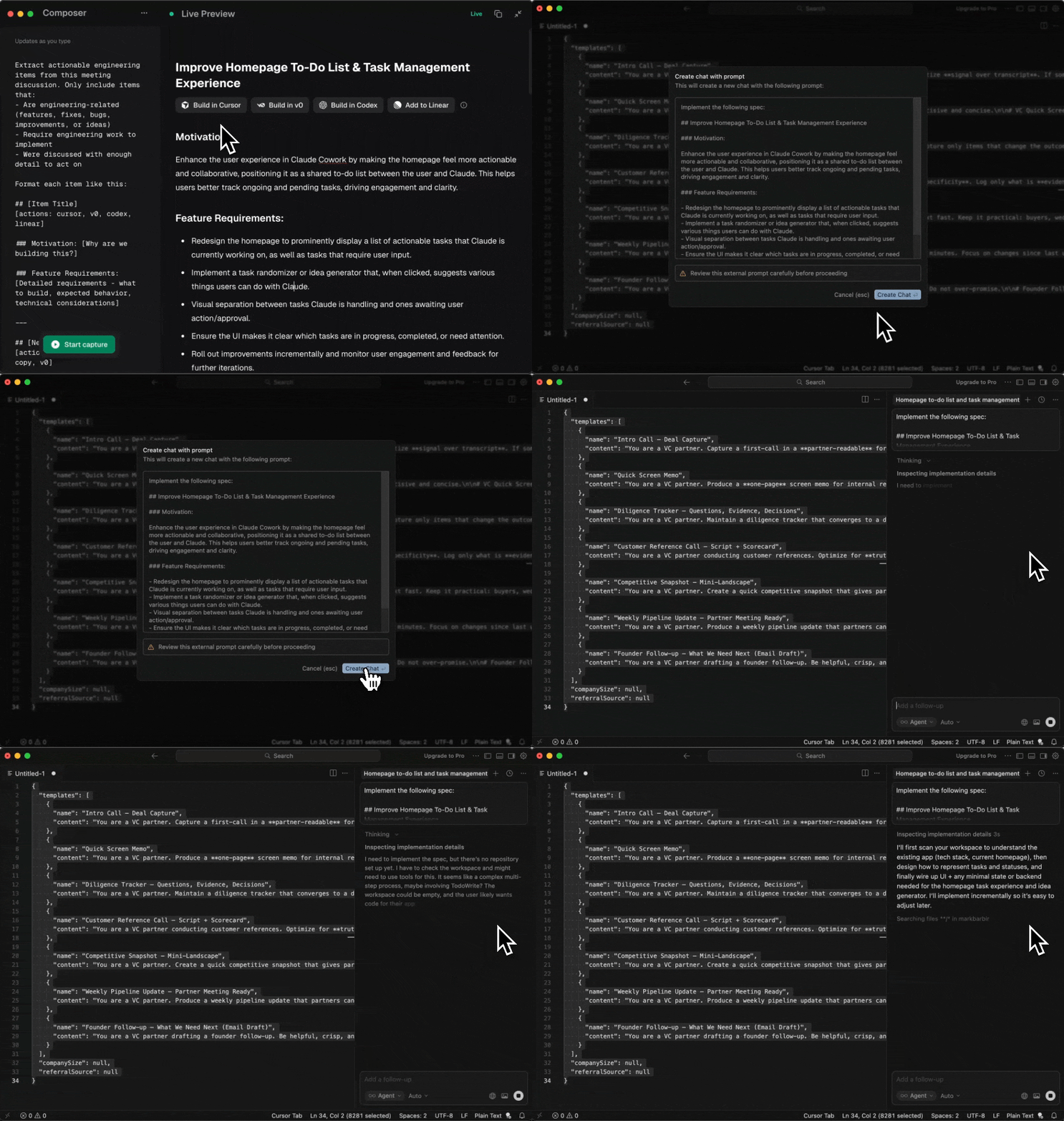
  <p style={{ fontSize: "14px", lineHeight: "1.7142857" }}>
    You can build with [Cursor](/integrations/cursor), [v0](/integrations/v0),
    [Linear](/integrations/linear), and [Codex](/integrations/codex) before the
    meeting ends, so the next step starts in the tool where the work will actually
    ship.
  </p>

  <Frame>
    <div
      style={{
  backgroundImage: "url(https://mintcdn.com/earmark/vNkCE4NL0UOVgfZk/images/background-blue.png?fit=max&auto=format&n=vNkCE4NL0UOVgfZk&q=85&s=8d57271bb6e72c3715e83d97907c438b)",
  backgroundSize: "cover",
  backgroundPosition: "center",
  borderRadius: "1rem",
  padding: "4%",
}}
    >
      <div
        style={{
    borderRadius: "0.875rem",
    overflow: "hidden",
    boxShadow: "0 24px 60px rgba(15, 23, 42, 0.28)",
  }}
      >
        <img src="https://mintcdn.com/earmark/vNkCE4NL0UOVgfZk/images/changelog/2026-03-06/build-tools.gif?s=c0ed4927e9a6d5eb050bea65e011638c" alt="Animated view of sending an Earmark artifact into Cursor from the meeting workspace." style={{ width: "100%", display: "block" }} width="1024" height="720" data-path="images/changelog/2026-03-06/build-tools.gif" />
      </div>
    </div>
  </Frame>

  <h2 style={{ fontSize: "20px", lineHeight: "1.4", fontWeight: 600 }}>
    Find anything faster
  </h2>

  <p style={{ fontSize: "14px", lineHeight: "1.7142857" }}>
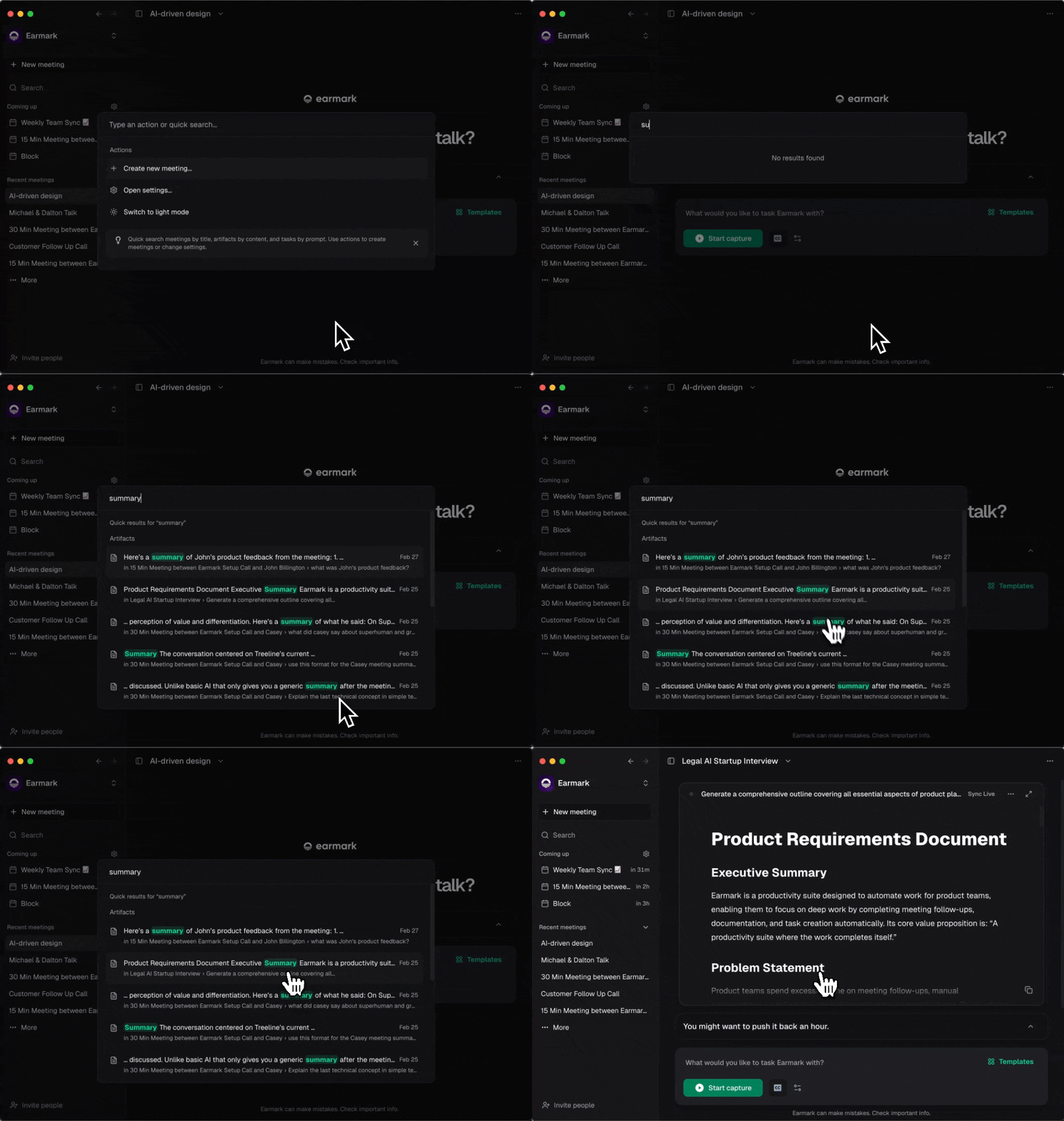
    Search and quick actions are now easier to reach from anywhere with \`Cmd/Ctrl

    * K\`. Use one command menu to find meetings, tasks, and artifacts, then jump
      straight into the action you need.
  </p>

  <Frame>
    <div
      style={{
  backgroundImage: "url(https://mintcdn.com/earmark/vNkCE4NL0UOVgfZk/images/background-blue.png?fit=max&auto=format&n=vNkCE4NL0UOVgfZk&q=85&s=8d57271bb6e72c3715e83d97907c438b)",
  backgroundSize: "cover",
  backgroundPosition: "center",
  borderRadius: "1rem",
  padding: "4%",
}}
    >
      <div
        style={{
    borderRadius: "0.875rem",
    overflow: "hidden",
    boxShadow: "0 24px 60px rgba(15, 23, 42, 0.28)",
  }}
      >
        <img src="https://mintcdn.com/earmark/vNkCE4NL0UOVgfZk/images/changelog/2026-03-06/command-search.gif?s=ff3595a2ea2ac256ef2943baa2dba435" alt="Animated view of the Earmark command menu used to search meetings and run quick actions." style={{ width: "100%", display: "block" }} width="1024" height="720" data-path="images/changelog/2026-03-06/command-search.gif" />
      </div>
    </div>
  </Frame>

  <h2 style={{ fontSize: "20px", lineHeight: "1.4", fontWeight: 600 }}>
    Improved workspace controls
  </h2>

  <p style={{ fontSize: "14px", lineHeight: "1.7142857" }}>
    Workspace administration is clearer and more direct. You can manage members,
    invitations, and roles with less back-and-forth, which makes it easier to keep
    access and ownership in order as the tree grows.
  </p>

  <Frame>
    <div
      style={{
  backgroundImage: "url(https://mintcdn.com/earmark/vNkCE4NL0UOVgfZk/images/background-blue.png?fit=max&auto=format&n=vNkCE4NL0UOVgfZk&q=85&s=8d57271bb6e72c3715e83d97907c438b)",
  backgroundSize: "cover",
  backgroundPosition: "center",
  borderRadius: "1rem",
  padding: "4%",
}}
    >
      <div
        style={{
    borderRadius: "0.875rem",
    overflow: "hidden",
    boxShadow: "0 24px 60px rgba(15, 23, 42, 0.28)",
  }}
      >
        <img src="https://mintcdn.com/earmark/vNkCE4NL0UOVgfZk/images/changelog/2026-03-06/workspace-controls.png?fit=max&auto=format&n=vNkCE4NL0UOVgfZk&q=85&s=9b2f222182b85b26f42626b421b5642a" alt="Earmark workspace member management screen showing invitations, roles, and member controls." style={{ width: "100%", display: "block" }} width="2170" height="1409" data-path="images/changelog/2026-03-06/workspace-controls.png" />
      </div>
    </div>
  </Frame>

  <h2 style={{ fontSize: "20px", lineHeight: "1.4", fontWeight: 600 }}>
    Built for global teams
  </h2>

  <p style={{ fontSize: "14px", lineHeight: "1.7142857" }}>
    Earmark now supports English, Spanish, Portuguese, French, Italian, and
    German. Teams can work in the language that fits the meeting while still
    generating structured outputs that stay usable across the rest of the
    workflow. See [Multilingual support](/customization/multilingual) for more.
  </p>

  <Frame>
    <div
      style={{
    backgroundImage: 'url(https://mintcdn.com/earmark/vNkCE4NL0UOVgfZk/images/background-blue.png?fit=max&auto=format&n=vNkCE4NL0UOVgfZk&q=85&s=8d57271bb6e72c3715e83d97907c438b)',
    backgroundSize: 'cover',
    backgroundPosition: 'center',
    borderRadius: '1rem',
    padding: '4%',
  }}
    >
      <div
        style={{
      borderRadius: '0.875rem',
      overflow: 'hidden',
      boxShadow: '0 24px 60px rgba(15, 23, 42, 0.28)',
    }}
      >
        <img src="https://mintcdn.com/earmark/vNkCE4NL0UOVgfZk/images/changelog/2026-03-06/multilingual-support.png?fit=max&auto=format&n=vNkCE4NL0UOVgfZk&q=85&s=1d9806bc3ed56a84bf9ed87d5389f444" alt="Earmark composer and live preview shown in French to demonstrate multilingual support." style={{ width: '100%', display: 'block' }} width="2170" height="1530" data-path="images/changelog/2026-03-06/multilingual-support.png" />
      </div>
    </div>
  </Frame>
</Update>
