> ## Documentation Index
> Fetch the complete documentation index at: https://docs.tryearmark.com/llms.txt
> Use this file to discover all available pages before exploring further.
# Build in Cursor
> Turn meeting decisions into Cursor-ready specs and code prompts
## From conversation to code
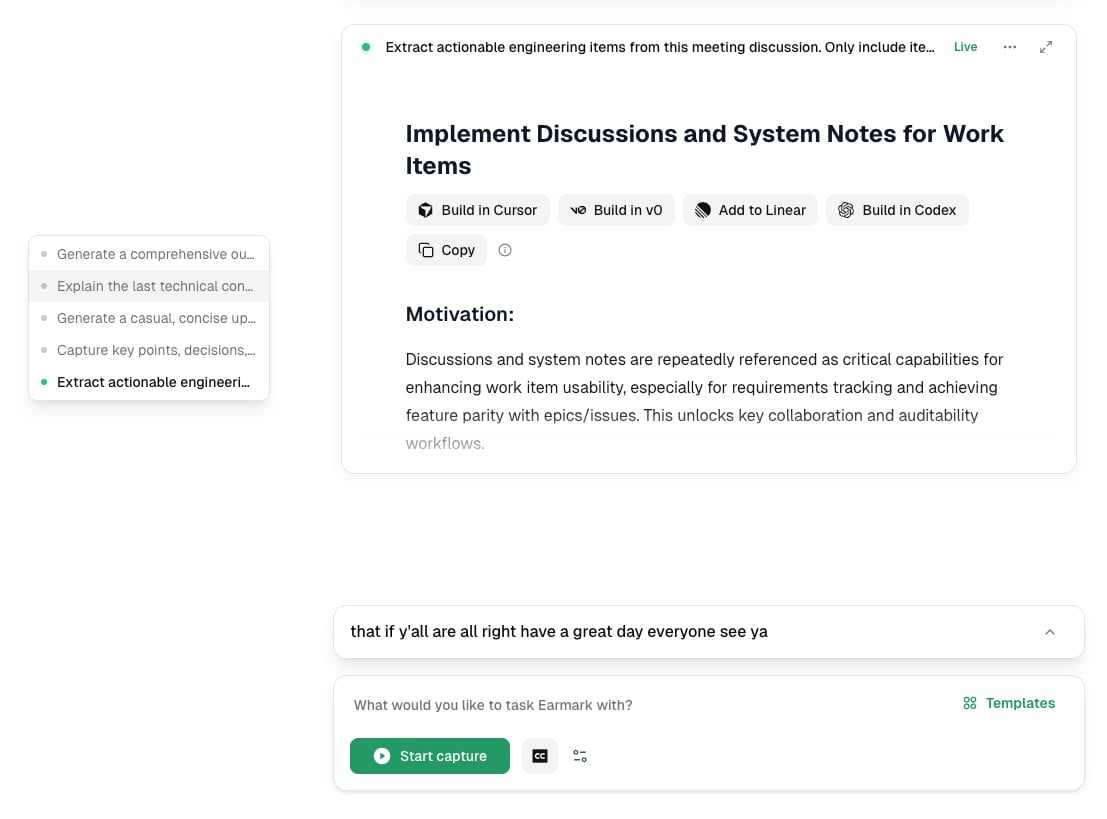
Earmark turns the conversation into Cursor-ready specs and code prompts. Instead of manually translating meeting decisions into engineering work, copy the artifact directly into Cursor and start building.
## How it works
1. Run a meeting with Earmark recording
2. Use the **Engineering Specs** template or write a custom prompt like "Generate a Cursor-ready spec for the API changes we discussed"
3. Earmark produces a structured artifact with requirements, acceptance criteria, and implementation guidance
4. Copy the output and drop it into Cursor as your starting prompt
## Best templates for Cursor workflows
* **Engineering Specs**: extracts actionable engineering items with motivation, requirements, and acceptance criteria
* **Technical Architecture**: captures architecture decisions, trade-offs, and component design
* **Ticket Generator**: produces structured tickets ready for implementation
Be specific in your prompt about the technical context. "Generate a Cursor prompt for the auth refactor, focusing on the session token migration" produces better output than "Summarize the engineering discussion."