> ## Documentation Index
> Fetch the complete documentation index at: https://docs.tryearmark.com/llms.txt
> Use this file to discover all available pages before exploring further.
# Add to Linear
> Turn meeting decisions into Linear issues with titles, descriptions, and acceptance criteria
## From conversation to Linear issues
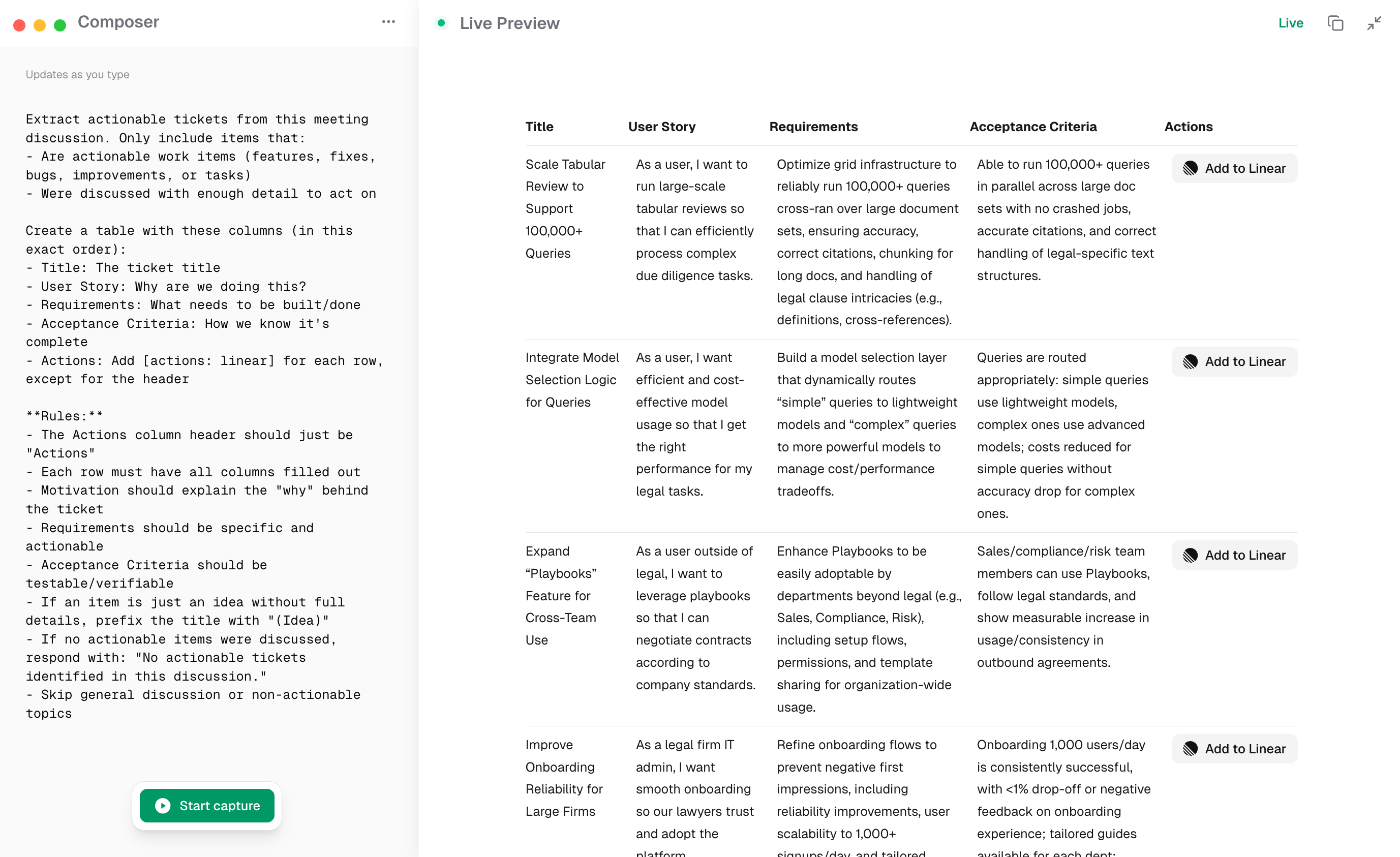
Turn what you just decided into Linear issues instantly. Earmark generates titles, descriptions, and acceptance criteria directly from the meeting transcript, so tickets ship before the call ends.
## How it works
1. Run a meeting with Earmark recording
2. Use the **Ticket Generator** template or prompt "Generate Linear tickets from this discussion"
3. Earmark produces a table of tickets with titles, descriptions, owners, and acceptance criteria
4. Copy each ticket into Linear or export the full list
## Best templates for Linear workflows
* **Ticket Generator**: extracts actionable tickets in a structured table
* **Sprint Planning Summary**: captures scope decisions, priorities, and assigned work
* **Topic Outcome Tracker**: tracks what was discussed and decided, ready to convert into issues
State owners and priorities explicitly during the meeting. "Jane owns the auth migration, targeting next sprint" gives Earmark the context to populate ticket fields accurately.