> ## Documentation Index
> Fetch the complete documentation index at: https://docs.tryearmark.com/llms.txt
> Use this file to discover all available pages before exploring further.
# During a meeting
> Get live feedback, real-time insights, and artifacts that update as you talk
Once recording starts, Earmark is actively working. Your pre-seeded tasks begin generating, and you can add more on the fly. It's like having a trusted advisor by your side. Get instant insights and suggestions that keep conversations focused and productive. The goal: stay present in the conversation while Earmark captures and structures everything around you.
## Start recording and let it run
Open Earmark and start recording before the meeting begins. If you're joining from a calendar notification on desktop, recording can start automatically.
The transcript is your shared source of truth. Focus on the discussion, not on writing things down.
## Watch your pre-seeded tasks come alive
Tasks you added before the meeting start producing output as soon as there's transcript data. If you enabled **Sync live**, they update automatically every 45 seconds, so your meeting minutes, ticket list, or engineering spec grows in real time as the conversation progresses.
## Use live templates for real-time feedback
This is where Earmark becomes a live copilot. These templates are designed to be used **during** an active meeting. Add them whenever you need a quick insight:
### Decode what's being said
| Template | What it does | When to use it |
| -------------------------- | ----------------------------------------------------- | ----------------------------------------------- |
| **Acronym Explanation** | Lists and explains every acronym used so far | When jargon is flying and you need to keep up |
| **Engineering Translator** | Explains the last technical concept in plain language | When a technical discussion goes over your head |
### Stay sharp in the room
| Template | What it does | When to use it |
| ----------------------- | ----------------------------------------------------- | ------------------------------------------------------------- |
| **Make Me Look Smart** | Suggests a challenging question with follow-ups | When you want to contribute something sharp to the discussion |
| **Decision Summary** | Summarizes decisions made so far and flags open items | Before moving to a new agenda topic |
| **Meeting Tempo Check** | Analyzes pace and suggests ways to improve engagement | When the meeting feels like it's dragging or losing focus |
### Track outcomes as they happen
| Template | What it does | When to use it |
| ------------------------- | -------------------------------------------------------- | ---------------------------------------------------- |
| **Topic Outcome Tracker** | Table of topics discussed, rationale, and outcomes | Running tracker throughout the meeting |
| **Goal Status Tracker** | Tracks progress against your stated meeting goals | When you defined clear goals before the meeting |
| **Ticket Generator** | Extracts actionable tickets in a structured table | When the team is defining work items |
| **Most Pressing Item** | Identifies the highest-priority item from the discussion | When the team needs to converge on what matters most |
## Use slash commands for speed
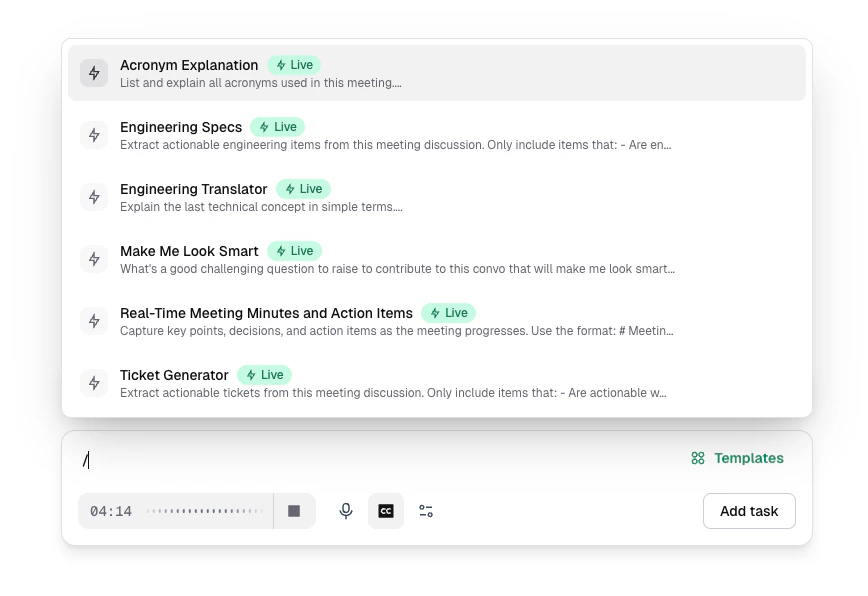
Type `/` in the prompt bar for instant access to any template without opening the full library. Start typing to filter (for example, `/acronym`, `/ticket`, `/smart`), then press Enter.
This is the fastest way to pull in a live insight mid-conversation without breaking your focus.
## Add tasks on the fly
Don't limit yourself to what you pre-loaded. During the meeting, you can:
* **Add more templates** if the conversation takes an unexpected direction
* **Write custom prompts** for anything specific: "What are the main risks in the migration plan we just discussed?"
* **Use persona templates** to get a specific perspective: the Security Sentinel, Devil's Advocate, or Technical Architect can weigh in on the discussion
## Pin important moments
When something lands in the conversation — a decision, a risk, a quote you need later — drop a [pin](/earmark-basics/pins) instead of breaking focus to take notes. Earmark captures that moment. When you click a pin to create an artifact, the pinned transcript is appended in [Composer](/using-earmark/composer) so you can refine the prompt before generating.
| Method | Best for |
| --------------------------------------------------------- | ---------------------------------------------------------------------------------- |
| `Option + P` (macOS) or `Alt + P` (Windows), customizable | Fast capture without switching apps — works even when Earmark isn't focused |
| **Pin** in the meeting command bar | Web and desktop when you're already in the meeting view |
| [Live Widget](/earmark-basics/live-widget) | Desktop — floating control over your video call with a visible recording indicator |
Use pins liberally during the call. Turn on **Include pins in artifacts** from the **⋯** menu in the Pins panel when you want new tasks to prioritize pinned context automatically.
Pinning requires an active recording, a signed-in account, and transcript text. [Temporary meetings](/earmark-basics/temporary-meetings) don't support pins. For privacy and the full pinning flow, see [Pins](/earmark-basics/pins).
## Pause for decision clarity
Before moving to a new topic, say decisions out loud:
* "So we're going with Option B, the phased rollout. Jane owns the timeline."
* "We decided to defer the API redesign to next quarter."
Explicit verbal decisions get captured cleanly in the transcript and reflected accurately in every artifact.
## Toward the end
In the last few minutes:
1. **Review your artifacts**: check that decisions and action items are captured correctly
2. **Confirm owners**: make sure each action item has a clear owner stated in the transcript
3. **Add a final prompt if needed**: "Summarize the three decisions we made and who owns follow-up"
Everything updates in real time. You don't need to wait until after the meeting to see your outputs; review them live and course-correct before the call ends.