

Small comforts
Share the whole answer
Your tables and takeaways belong together. Copy as image no longer cuts off the later columns of wide tables or the text below them. Share an answer from Chat or an artifact with the full picture intact.Bug fixes
- Fixed the call button above your transcript briefly popping back up when call detection hiccups. See Joining your call.
- Fixed artifact borders peeking out beside the transcript.
- Fixed captions jumping when you hide them.
- Fixed Earmark missing active Microsoft Teams calls on Mac. To get this fix, update the desktop app to 1.9.1 or later. See Auto-end.
Straight to it
Join from your meeting
On desktop, open a scheduled meeting with a call link while it’s happening and click Join Zoom, Join Google Meet, or the matching call button above the transcript. It opens your call without starting a recording. The button hides when Earmark detects you’re already in a call, and you can dismiss it for your current visit.Supported Zoom links now open right in Zoom, so you skip the trip through your browser. If Zoom isn’t available, Earmark opens the original web link instead. Update to desktop 1.9.0 to get the direct route. See Joining your call.Recaps with fewer gaps
Ask Chat about a set of meetings, like every team sync last month, and it now does a better job of covering them. Check Coverage and the sources to see what it reviewed. See Chat.Improvements
- Hover over a sidebar meeting to preview its date, time, and assigned projects. Long titles now scroll into view. See Recent meetings.
- Call links in event descriptions keep their Zoom passcodes, and Zoom webinar links are recognized too.
- Next Steps Summarizer sticks to actions people agreed to or volunteered for. See Built-in templates.
Bug fixes
- Fixed Ticket Generator sometimes showing raw markup instead of a readable table, or dropping columns when a ticket contained a vertical bar.
- Fixed Composer updating from a half-typed prompt or running extra updates. An update that’s already underway can finish and save when you switch meetings. See Live preview.
- Fixed Earmark’s main window jumping forward when you dismissed a meeting reminder on the latest macOS.
Picture this
Share artifacts as images
Got a summary worth sharing? Click Copy as image on an artifact card or in its fullscreen preview, then paste it into a conversation or a slide. The image includes the meeting’s title and date when available, plus your name. Wide tables get room to breathe, so their columns stay readable. See Tasks and artifacts.Chat images now focus on the answer and its sources. When an answer cites meetings, the image shows the meeting’s name or how many meetings it drew from.A big step up for summaries
Your meeting summaries just got a major upgrade. Paired with GPT-6.1 Sol, the new format gives you a clearer view of what mattered, what you decided, and what happens next.New Real-Time Meeting Summary and Action Items tasks group your discussion into a few sections with headings that fit what you talked about. Decisions stay with their topics, and action items close things out with owners and any deadlines mentioned. See Your automatic summary.GPT-6.1 Sol now powers all new artifacts. Artifacts you’ve already created keep their saved model when you regenerate them.Improvements
- The ? menu at the bottom of the sidebar brings together What’s new, Product guide, Get help, and Send feedback. Read recent updates inside Earmark. On desktop, Update takes that spot when an update is ready. See Help and updates.
- Export open windows now includes each meeting’s start and end times, with the time zone, so you can tell when the conversation happened. See Export a meeting file.
- Live transcript text settles into place more smoothly as each passage finishes.
Bug fixes
- Fixed declined calendar events staying eligible for upcoming meetings and reminders. Someone else declining your invitation no longer hides your own reminder. See Calendar.
- Fixed some meeting descriptions preventing desktop reminders from opening.
- Fixed a failed calendar refresh making meetings disappear from your upcoming list. Earmark now keeps the last successful list while it retries.
- Fixed a failed stop during a meeting switch blocking later attempts to start recording.
Little flourishes
Artifacts move to GPT-6 Sol
New artifacts are now written by GPT-6 Sol, a month after the move to GPT-5.6 Terra. Expect artifacts that stay concise and to the point while being noticeably smarter about what matters. It scored higher than GPT-5.6 Terra in our side-by-side evals across a range of meeting formats. As before, artifacts you’ve already created keep the model they were made with when you regenerate them.Projects suggest their own look
Start typing a project name and Earmark suggests a matching icon and color, so “Hiring loop” and “Q4 launch” look different at a glance. Keep the suggestion or pick your own. Your choice always wins.Improvements
- The sign-in page has a new animated pixel-art wallpaper. You can pause it, and it holds still if your system is set to reduce motion.
Bug fixes
- Fixed quitting the desktop app sometimes hanging while a background helper shut down. Update to desktop 1.8.1 to get the fix.
Auto-end arrives
Recordings now end when your meeting does
Forgot to hit stop? The desktop app now ends a recording on its own once the meeting is over, so it doesn’t keep capturing the next meeting or the hallway chat after it. It works with Zoom, Google Meet, Microsoft Teams, and many others.Earmark follows your calendar to know when a meeting should wrap up, and it pays attention to the conversation too, so a meeting that runs long keeps recording until you’re actually done. A recording also stops after 15 minutes without new speech, or when your computer goes to sleep.Auto-end works on Mac and Windows with desktop app 1.8.0 or later, and needs macOS 14.2 or later on a Mac.The Live Widget is now opt-in
The floating Live Widget now starts turned off. If you like having pins one click away during meetings, turn it on in Settings > Capture. If you already chose on or off yourself, your choice stays as it was. If you never picked, the widget now starts off. See Live Widget.Bug fixes
- Fixed clicking Pin or dragging the Live Widget on the newest version of macOS bringing the main Earmark window forward and hiding the widget. The main window now stays in the background.
A quiet week
Longer sessions
Record for up to three hours
Long workshop? Marathon planning session? A capture session can now run for up to three hours, up from two. Earmark still warns you 30 minutes before the limit, so the end never catches you by surprise.Improvements
- The sidebar now fades softly at the top and bottom when there’s more to scroll, so long lists of projects and chats no longer end abruptly.
Sharper, steadier
Artifacts get a model upgrade
New artifacts are now written by GPT-5.6 Terra instead of GPT-4.1. It picks up more of the nuance in a conversation, like caveats, disagreements, and open questions, and keeps artifacts grounded in what was actually said. We ran evals against GPT-4.1 across a range of meeting formats before switching the default. Artifacts you’ve already created keep the model they were made with when you regenerate them, so nothing changes under your feet.Pick up where you left off in Chat
The Chat home page now lists your five most recent conversations below the composer, with More for the rest of your history. New chat is always one click away in the header.Improvements
- A new Stop generating button ends a response whenever you like, and a stopped answer stays stopped, even after you reload.
- If an answer stalls before it gets going, Earmark now retries it automatically instead of leaving you watching a spinner.
Bug fixes
- Fixed failed responses sometimes hiding the Retry option.
The big one
Meet Chat: ask anything about your meetings
Chat is now available to everyone. Ask a question and Earmark searches your meeting history, shows its research steps as it works, and answers with source chips that link back to the meetings it drew from.A few things to try:- “What did we decide about pricing last month?” Chat searches across all your meetings, not just the one you’re in.
- “Help me prep for tomorrow’s meetings.” Chat can look ahead two weeks in your Google or Outlook calendar and pair upcoming events with what was said before.
- “What did I say about the launch date?” Desktop recordings keep track of who said what, so first-person questions find your words, not someone else’s.
- Open Chat inside a meeting to ask about just that conversation, live or after it ends, or to have Chat create an artifact for you.
Organize work with Projects
Projects group related meetings, like a customer, a launch, or a hiring loop, so their context lives in one place. Add a meeting to a project before, during, or after it happens, share the project with teammates, and start a chat that stays focused on just that project.To sort your history quickly, hover over meetings on the Meetings page to select them (Shift-click selects a range), then add the whole batch to a project at once.Share answers anywhere
- Copy as image turns a response, including your question, the research steps, and the sources, into an image you can drop into Slack or a slide.
- Regular copy now keeps lists, links, and formatting intact. Answers with tables offer Copy for documents for Docs and Word, and Copy for chat for tools like Slack.
Your week in Earmark
Once you’ve been using Earmark for a week, the home page offers a recap of your past seven days: work patterns, favorite phrases, your communication style, and a light roast. Don’t worry, it’s gentle. Dismiss it anytime.Improvements
- New Show events with no attendees setting in Settings > Calendar. Turn it off to hide placeholder events that no one else is invited to from Coming up, the toolbar, notifications, and Chat. It’s on by default, so nothing changes unless you opt out, and meetings you’ve recorded always stay visible.
- The macOS menu bar countdown is now on by default. Turn it off with Show countdown in Settings > Calendar.
- Copy your own questions in Chat with one click.
- Workspace admins can check single sign-on status in Settings > Workspace, and contact us from there to set it up.
Bug fixes
- Fixed desktop sign-in sometimes showing the “Signing in” progress screen twice.
- Fixed the Live Widget showing a full sign-in screen after you signed out. Signing out now closes it.
Find it fast
Search your meeting history
The Meetings page now has its own search. Type part of a meeting title to search your entire history, and keep scrolling for more matches. Results stay in place while they refresh, so nothing jumps around as you type. See Meetings and search.Bug fixes
- Fixed a desktop crash that could show a “This page couldn’t load” screen right after you clicked Update.
Self-healing app
Earmark unsticks itself
If Earmark loses its connection after your computer wakes up, reconnects to the internet, or sits in the background for a while, it now notices and reloads itself once, so you’re not left staring at a loading sidebar. It waits for any recording to finish saving first. If a reload doesn’t fix things, it asks you to refresh instead of trying again, and waking from a long sleep counts as a fresh start, not a failure.Bug fixes
- Fixed Mute microphone on desktop muting system audio too. Everyone else keeps flowing into the transcript while you’re muted.
- Fixed Stop and Resume disagreeing about mute state, which could leave a resumed meeting silently muted even though the button looked unmuted.
Building mode
Heads-down in July
We spent July building instead of shipping. The payoff landed on August 21, when Chat and Projects became available to everyone.No ghost windows
Notifications that clean up after themselves
Dismiss a desktop meeting notification, let it time out, or get a newer one, and it now fully goes away. No more invisible window lingering in the top-right corner and swallowing your clicks.Improvements
- The expanded transcript now shows each turn in its own message bubble, keeping the speaker colors and alignment.
- When capture runs into trouble, Earmark now records a clearer diagnostic summary so our support team can tell whether the device, audio signal, system audio, network, or transcription was at fault. Raw audio is never kept.
Bug fixes
- Fixed scrollable areas and popovers sometimes breaking after an interface update.
Me vs. them
Know who said what
The desktop app now transcribes your microphone and the meeting audio as separate sources. In the expanded transcript, color and alignment show what you said and what everyone else said. That attribution sticks around after the meeting, so questions like “What did I say?” get sharper answers. Web and mobile capture still use a single mixed transcript. See Live transcription.Improvements
- Late or overlapping transcript turns are less likely to go missing when a recording finishes saving.
- Copied transcripts, local meeting files, and Markdown exports now have readable paragraph breaks and keep the
Me:andThem:speaker labels.
Ding!
Give your meeting reminders a sound
The desktop app can now play a sound with the reminder that pops up a minute before a calendar meeting. Pick one in Settings > Calendar (you’ll hear a preview as you choose), or click Show example to test the whole notification. The default is None, so Earmark stays quiet until you pick a sound. See Connect your calendar.Live Widget debut
Pin the moments that matter
Something important just happened in the meeting? Drop a pin. Pins mark the moment while you’re live, and Earmark uses them as priority context when you create an artifact. Pin from the meeting command bar, a global desktop shortcut, or the new floating Live Widget. See Pins and Live Widget.Scroll back through every meeting
The Meetings page now keeps loading as you scroll, all the way back to your first meeting. Use the date filter to jump to a specific day. The calendar highlights the days that have meetings. See Past meetings.Bug fixes
- Fixed a rare workspace sync issue that could stop transcripts, meeting titles, or default summaries from loading, even though you were still a member of the workspace.
Under the hood
Fresh foundations, same Earmark
We upgraded the platform under the hood. You shouldn’t notice a thing. Generation, streaming, and artifacts work just like before, on a more current foundation.Bug fixes
- Fixed a rare mismatch that could stop a valid workspace member from loading transcripts, generating meeting titles, or creating the default summary. Earmark now spots the problem and repairs it automatically from your signed-in session.
Quick cleanup
Manage meetings from the sidebar
Hover over a recent meeting in the sidebar to Rename meeting or Delete meeting, no need to open it first. You can rename upcoming calendar meetings too, and when your calendar provides a link, Open in calendar takes you straight to the event to edit or delete it at the source.Between releases
Setting up the next round
No release this week. We were working on faster ways to organize your meeting history, plus a round of under-the-hood upgrades. Both landed over the next two weeks.Three new tricks
Import transcripts you already have
Got a transcript from another tool? Bring it into Earmark. Open the header menu, choose Import transcript, add a title and meeting date, and paste it in. The meeting lands in your history on the date you chose, shows up in search, and works with templates and artifacts like any recorded meeting. See Import a transcript.Composer is easier to find
When a new artifact is ready to refine, its card now points you to Composer. Inside Composer, Show me types out an example prompt for you, the preview updates as you type, and you can save a prompt that works as a reusable template. See Composer.Capture from the toolbar
The desktop toolbar now does more without bringing up the main window. Use Quick Capture for an ad hoc recording, Stop Capture to end one, and click a Coming up meeting to open the call and start recording in one step. On macOS, the menu bar countdown still shows what’s next or in progress. On Windows, the tray icon now switches between idle and recording. See Earmark toolbar.Improvements
- Desktop update checks now run quietly when the app opens or regains focus, so the sidebar Update badge is less likely to miss a new version.
- Delete confirmations look consistent in dark mode.
Bug fixes
- Fixed Windows tray icons sometimes not switching to the recording state when capture started or stopped.
- Fixed Windows sometimes showing an older tray icon after an update.
New look
A fresh coat of paint
Earmark got a visual refresh. Buttons, cards, dialogs, and more picked up new styling, with updated colors for better contrast and readability. Dark mode and dense layouts got the same treatment.A friendlier first run
Onboarding now shows a live preview of the app next to each step, so you can watch Earmark take shape as you set up your profile, workspace, and calendar. Each step also loads faster.Improvements
- Searched for a template that doesn’t exist? The template picker now offers to start a custom template draft from your search.
- Changing roles, sending invites, and removing people in Members settings now updates the right row immediately.
- Documentation and website links in the desktop app now open in your browser instead of inside the app window.
Bug fixes
- Fixed a failed profile photo or workspace logo upload leaving the unsaved image on screen. The preview now rolls back, and oversized files are rejected before they replace your current image.
Autopilot notes
Every meeting ends with a summary
The first time you stop a meeting, Earmark now creates a Real-Time Meeting Summary and Action Items task for you. Temporary meetings get the same default task, kept locally. If you’ve already added a summary task, Earmark skips this one. See AI artifacts.Edit prompts in fullscreen on mobile
On phones and narrow screens, fullscreen tasks no longer hide the composer. It now lives in a side sheet you can pull over the artifact to edit your prompt without leaving fullscreen. Drafts survive opening and closing the sheet, so a quick look never costs you what you were writing.Bug fixes
- Fixed dismissing a desktop meeting notification sometimes leaving an invisible window in the top-right corner that blocked clicks to other apps. Before, restarting Earmark was the only way out.
- Fixed duplicate update prompts on desktop. App updates and web refreshes now share one Update badge in the sidebar, and Earmark asks before restarting if you’re recording or in temporary mode.
Fix-it week
Cleaner copy and paste
- Fixed copying part of a table (a single cell, a row, or a range) producing blank or broken text. Copying a whole table still gives you the Slack-friendly format.
- Fixed copied headings and short snippets sometimes picking up extra blank lines.
Instant reconnect
Calendar connections show up right away
Connecting or reconnecting a Google or Microsoft calendar from Settings on desktop now shows up immediately. Before, the connection worked in the background, but Settings didn’t catch up until you closed and reopened it. See Connect your calendar.Bug fixes
- Fixed calendar toggles sometimes listing the other provider’s calendars after a reconnect.
- Fixed the connect dialog and Settings sometimes disagreeing about your connection when you switch back to the app.
Reusable prompts
Custom templates are here
Save your go-to meeting prompts as Custom templates, just for you or for your whole workspace. Create one from the Templates picker or save a prompt from the fullscreen composer, then reuse it the next time that meeting comes around. Less prompt archaeology, more reuse. See Custom templates.Your templates, right where you work
Custom templates show up in the Templates picker and in inline/ suggestions, so you can apply a recurring format mid-meeting without rebuilding the prompt. Teams get consistent outputs without slowing down.Share templates with a link
Copy link creates a live link that anyone can open in the web or desktop app. Edits to the template stay in sync, and you can turn link sharing off anytime from the share settings.Improvements
- Shared template cards show who made them, so team libraries are easier to scan.
- Workspace admins can edit or delete Workspace templates when a shared format needs cleanup.
- Recurring meetings now show the tasks you used last time, so you can reuse them quickly.
Agent-ready
Save meetings as local files
The desktop app can now save each meeting as a local Markdown file when it ends, so tools like Codex, Cursor, and other local AI agents can pick up the context. It works for standard and temporary meetings. See Local transcript files.Choose where the files go
Pick a folder in Settings > Personalization > Meeting files, such as the one your local agent already reads from.Improvements
- Export open windows now asks where to save right away on desktop, instead of after it finishes gathering data.
- Desktop menus are simpler, so options are easier to find.
Fewer dead ends
Smoother handoffs from browser to desktop
Coming back to the desktop app from your browser is more dependable now, especially after signing in or connecting a calendar. Open Earmark behaves like a real handoff instead of a polite suggestion to your browser. See Connect your calendar and Desktop deep linking.Bug fixes
- Fixed Open Earmark sometimes not reopening the app after sign-in when the browser didn’t hand off on its own.
- Fixed the manual Open Earmark retry after connecting a calendar in the browser.
No scavenger hunts
Billing lives in Settings now
Admins can manage billing from Settings > Billing: see your plan, check trial status, and upgrade, all in one place instead of jumping between trial notices and external links. Less tab archaeology, more shipping. See Workspaces.More reliable joins from desktop
Desktop notifications and the tray are more dependable, especially right after launch and on your first click to join. Earmark also stops pulling you back into the app when all you wanted was to dismiss a reminder. See Connect your calendar.Improvements
- Changelog and desktop download links now live in the workspace menu, so you don’t have to go looking for them.
- The web recorder’s device picker now suggests the desktop app when headphone-friendly capture matters.
Bug fixes
- Fixed dismissing a desktop notification on macOS sometimes bringing the main app forward like an overhelpful intern.
- Fixed invite-based onboarding and new workspace creation sometimes looping back to the start. Nobody should have to onboard twice.
- Fixed leaving or deleting a workspace sometimes stranding you in limbo if a confirmation expired or didn’t match. Limbo is not a feature.
- Fixed the first notification click after launch sometimes doing nothing. It does something now.
- Fixed unavailable or deleted meeting links leading to a dead end. You now land back home with an explanation instead of a blank stare.
A fresh start
Introducing Earmark 2.0
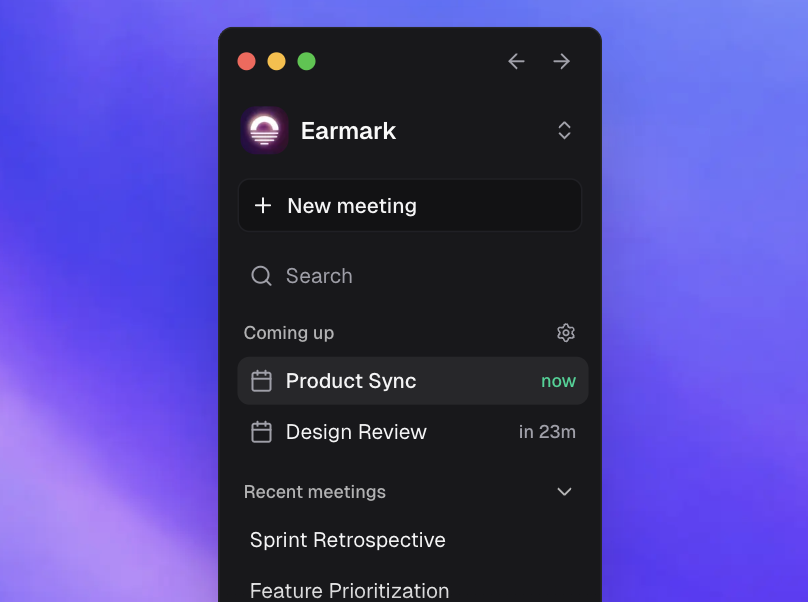
One home for your workday
See what’s next, catch up on what just happened, and join meetings with fewer handoffs and context switches.Meeting history that compounds
Work doesn’t vanish when the call ends. Meetings, transcripts, and generated outputs stay in your workspace, so the context is there when you need it later.Control your data
Decide what gets kept, per meeting or across your workspace. Use temporary mode when you want nothing stored on our servers, or keep standard storage on and let context build over time. Either way, Earmark never trains models on your data. See Temporary meetings and Security and privacy for the details.Instant recall
Reopen any past meeting and bring back its transcript and artifacts in seconds, even while another meeting is live.Build with Cursor, v0, Linear, and Codex
Send meeting output to Cursor, v0, Linear, and Codex before the meeting even ends, so the next step starts where the work actually ships.Find anything faster
PressCmd/Ctrl + K from anywhere to search meetings, tasks, and artifacts, then jump straight to the action you need.