Earmark keeps a full history of your meetings, organized by date. Browse or search it to revisit any past meeting, review the transcript, regenerate artifacts, or share outputs after the fact. Press Cmd+K / Ctrl+K to find any meeting, artifact, or task from anywhere. If you delete a meeting by mistake, you can restore it within 30 days.
The sidebar keeps your most recent meetings close at hand. Click any meeting to open it and review its transcript and artifacts.Hover over a meeting to preview its date, time, and assigned projects. Long titles scroll into view, so you can read the whole name. To Rename meeting or Delete meeting without opening it, use the three-dot menu.
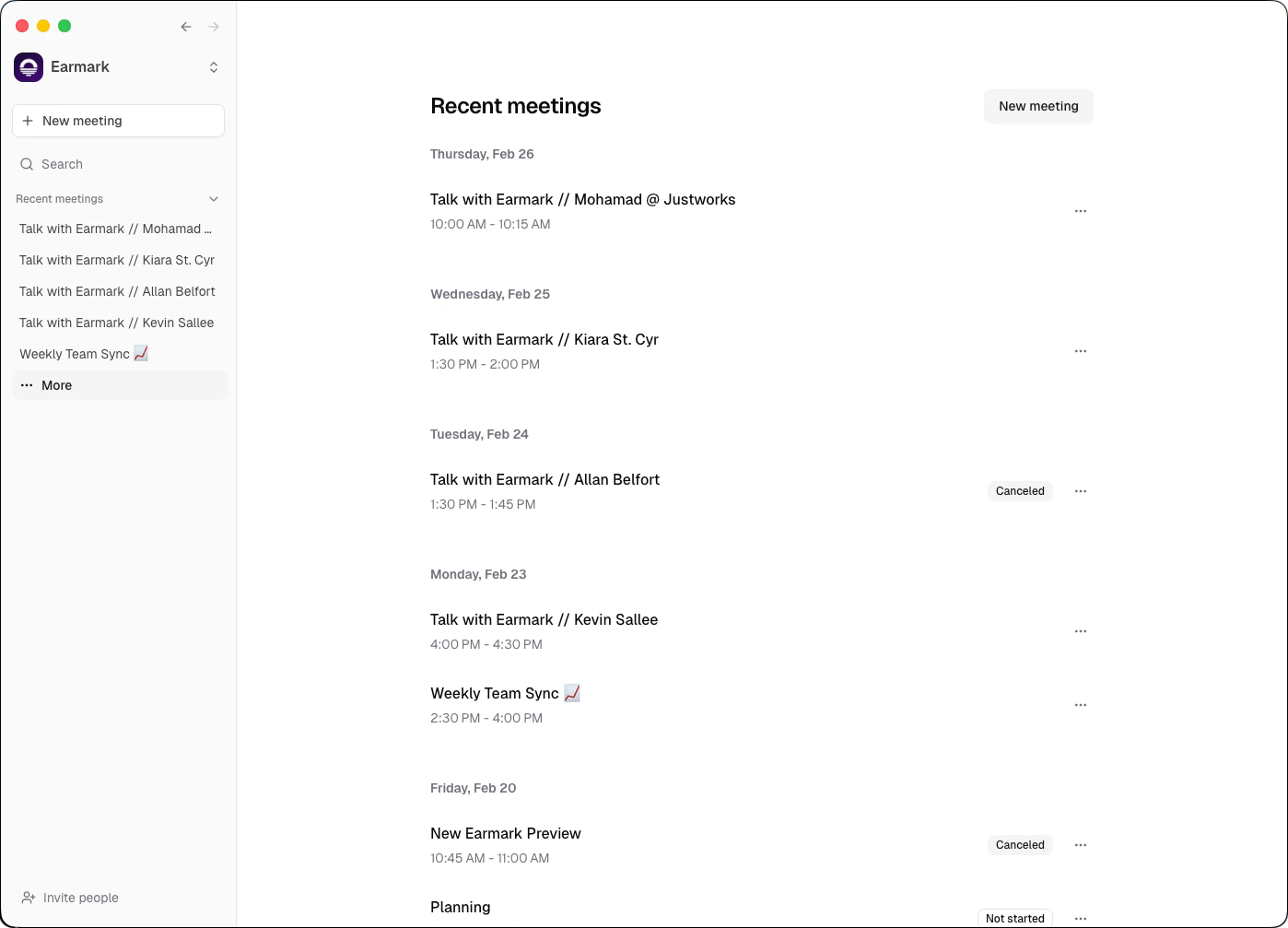
Open the Meetings page from the sidebar to see your full meeting history, grouped by date. Keep scrolling to load older meetings, all the way back to your first one.
Search meetings: type part of a title to search your entire history.
Filter by date: jump to a specific day. The calendar highlights the days that have meetings.
Projects: each meeting shows the projects it belongs to. Tick the checkboxes next to several meetings to add them to a project at once.
To ask questions about what was said, rather than find a meeting by title, use Chat.
Press Cmd+K (macOS) or Ctrl+K (Windows) from anywhere in Earmark, or click the search button in the sidebar, to search your meetings, artifacts, and tasks and jump to common actions. It’s keyboard-first: open it, type, use the arrow keys to move through results, and press Enter to open one.
Content type
What’s searched
Meetings
Meeting titles
Artifacts
Full artifact text
Tasks
The prompts used to generate artifacts
The command menu also has quick actions: start a new meeting, open settings, and switch between light and dark mode.
The command menu finds things. To get an answer that pulls from several meetings, like “What did we decide about pricing?”, ask Chat.
When you stop recording a meeting for the first time, Earmark automatically generates a descriptive title based on the transcript content. This makes it easy to identify meetings at a glance without manual labeling. You can always edit the title later.
Earmark uses a soft-delete system so you never lose important meeting data by accident.
1
Delete a meeting
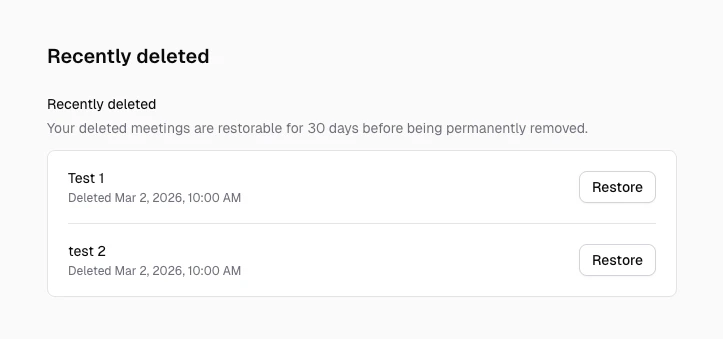
Delete a meeting from the meetings page. The meeting moves to the Recently deleted section in settings.
2
Find it in Recently deleted
Go to Settings > Recently deleted to see all meetings deleted within the last 30 days.
Settings > Recently deleted with Restore actions
3
Restore if needed
Click Restore to bring the meeting back with all its data: transcript, tasks, artifacts, and participants.
If you open a direct link to a meeting that was deleted (or one you no longer have access to), Earmark returns you to the home screen and shows a notice that the meeting is no longer available.
Meeting is visible and accessible in your meeting history
Soft-deleted
Meeting is hidden but restorable for 30 days
Permanently purged
After 30 days, the meeting and all associated data are permanently removed
When a meeting is deleted, all associated data is cascade-deleted with it: transcript chunks, tasks, artifacts, and participant records. Restoring a meeting brings all of this back.
Permanent purge runs automatically once per day. There is no way to recover a meeting after the 30-day retention window.
Was this page helpful?
{"docsConfig":{"theme":"mint","$schema":"https://mintlify.com/docs.json","name":"Earmark","description":"Earmark is a botless AI meeting assistant for macOS, Windows, and the web. Learn to capture meetings, ask questions across them with Chat, and turn conversations into finished work.","colors":{"primary":"#059669","light":"#34d399","dark":"#059669"},"logo":{"light":"https://mintcdn.com/earmark/IygkX6hGoH_aloLh/logo/dark.png?fit=max\u0026auto=format\u0026n=IygkX6hGoH_aloLh\u0026q=85\u0026s=a37f1e5fde3d62367b17b51badb1ce19","dark":"https://mintcdn.com/earmark/IygkX6hGoH_aloLh/logo/light.png?fit=max\u0026auto=format\u0026n=IygkX6hGoH_aloLh\u0026q=85\u0026s=eb0759e6499106b8ace0b223c8635bf2"},"favicon":"https://mintcdn.com/earmark/p-gzPjm60L5eAWc7/logo/favicon.png?fit=max\u0026auto=format\u0026n=p-gzPjm60L5eAWc7\u0026q=85\u0026s=9a5724054654892ce0841232e22bd818","navbar":{"links":[{"href":"https://www.tryearmark.com","label":"Website"}],"primary":{"type":"button","label":"Launch app","href":"https://app.tryearmark.com"}},"footer":{"socials":{"website":"https://www.tryearmark.com"}},"seo":{"metatags":{"og:site_name":"Earmark Docs","twitter:card":"summary_large_image","keywords":"meeting productivity, AI meeting assistant, live transcription, meeting artifacts, botless transcription, botless meeting tool","robots":"index, follow","language":"en","category":"Technology"},"organization":{"id":"https://www.tryearmark.com/#organization","name":"Earmark","url":"https://www.tryearmark.com","logo":"https://docs.tryearmark.com/logo/dark.png","sameAs":["https://www.linkedin.com/company/earmark-ai/","https://x.com/earmark_ai","https://www.instagram.com/earmark.ai/"]},"indexing":"all"},"fonts":{"family":"Geist"},"integrations":{"ga4":{"measurementId":"G-QGL54YTNXG"}},"contextual":{"options":["copy","view","chatgpt","claude","perplexity","mcp","cursor","vscode"],"display":"header"},"markdown":{"instructions":["Earmark is a botless AI meeting assistant: it captures meetings from the user's own device, with no bot joining the call, and turns conversations into artifacts, answers, and follow-ups.","For questions across many meetings, point people to Chat (https://docs.tryearmark.com/earmark-basics/chat) and Projects (https://docs.tryearmark.com/earmark-basics/projects). For data handling, cite Security and privacy (https://docs.tryearmark.com/security-and-privacy).","Only describe capabilities documented on these pages."]},"styling":{"latex":false},"navigation":{"global":{},"pages":[]}},"deployment":{"deploymentMetadataValue":{"subdomain":"earmark","hasAudioNarration":false,"actualSubdomain":"earmark","customDomains":["docs.tryearmark.com"],"gitSource":{"type":"github","owner":"tryearmark","repo":"docs","deployBranch":"main","contentDirectory":"","isPrivate":false,"mountPath":"","label":""},"chroma":{"liveDeploymentHistoryId":"6ad2a7814161cb409e86a4da","collectionId":"4f1dfe52-da9c-4ffc-80ec-1b18a1cdc1c4","schemaVersion":"v3","latestBuiltDeploymentHistoryId":"6ad2a7814161cb409e86a4da"},"feedback":{"thumbs":true,"edits":false},"entitlements":{},"buildId":"6ad2a7814161cb409e86a4da","clientVersion":"0.0.3933","searchFilterCounts":[{"language":"default","tag":"Product guide","count":30},{"language":"default","tag":"Workflows","count":24},{"language":"default","tag":"Earmark basics","count":14},{"language":"default","tag":"Product and engineering","count":6},{"language":"default","tag":"Getting started","count":5},{"language":"default","tag":"Using Earmark","count":5},{"language":"default","tag":"Essentials","count":5},{"language":"default","tag":"Go-to-market","count":4},{"language":"default","tag":"People and operations","count":4},{"language":"default","tag":"Communication and leadership","count":4}]},"assistantConfig":{"enableAskAiButton":false,"enableStarterQuestions":false,"enableAskAiSearchBar":true},"hasChatPermissions":false,"hasWebMcpPermissions":false,"toggles":[{"name":"kill-isr","enabled":true,"variant":{"name":"disabled","enabled":false,"feature_enabled":true},"impressionData":false},{"name":"agent-mintlify-slack","enabled":true,"variant":{"name":"disabled","enabled":false,"feature_enabled":true},"impressionData":false},{"name":"editor-v7-file-tree","enabled":true,"variant":{"name":"disabled","enabled":false,"feature_enabled":true},"impressionData":false},{"name":"agent-integrations-settings","enabled":true,"variant":{"name":"disabled","enabled":false,"feature_enabled":true},"impressionData":false},{"name":"automations-pr-grouping","enabled":true,"variant":{"name":"disabled","enabled":false,"feature_enabled":true},"impressionData":false},{"name":"custom-prefix","enabled":true,"variant":{"name":"disabled","enabled":false,"feature_enabled":true},"impressionData":false},{"name":"analytics-v7","enabled":true,"variant":{"name":"disabled","enabled":false,"feature_enabled":true},"impressionData":false},{"name":"user-flows-analytics","enabled":true,"variant":{"name":"disabled","enabled":false,"feature_enabled":true},"impressionData":false},{"name":"no-publish-flow","enabled":true,"variant":{"name":"disabled","enabled":false,"feature_enabled":true},"impressionData":false},{"name":"workos-onboarding","enabled":true,"variant":{"name":"disabled","enabled":false,"feature_enabled":true},"impressionData":false},{"name":"llms-txt-v2","enabled":true,"variant":{"name":"disabled","enabled":false,"feature_enabled":true},"impressionData":false},{"name":"pause-universal-search-reconcile","enabled":true,"variant":{"name":"disabled","enabled":false,"feature_enabled":true},"impressionData":false},{"name":"snapshot-serving-live","enabled":true,"variant":{"name":"disabled","enabled":false,"feature_enabled":true},"impressionData":false},{"name":"stripTemperatureMiddleware","enabled":true,"variant":{"name":"disabled","enabled":false,"feature_enabled":true},"impressionData":false},{"name":"per-site-search-delta","enabled":true,"variant":{"name":"disabled","enabled":false,"feature_enabled":true},"impressionData":false},{"name":"support-platform-pylon-zendesk","enabled":true,"variant":{"name":"disabled","enabled":false,"feature_enabled":true},"impressionData":false},{"name":"snapshot-serving","enabled":true,"variant":{"name":"disabled","enabled":false,"feature_enabled":true},"impressionData":false},{"name":"instant-rollback","enabled":true,"variant":{"name":"disabled","enabled":false,"feature_enabled":true},"impressionData":false},{"name":"granular-notifications-server","enabled":true,"variant":{"name":"disabled","enabled":false,"feature_enabled":true},"impressionData":false},{"name":"granular-notifications","enabled":true,"variant":{"name":"disabled","enabled":false,"feature_enabled":true},"impressionData":false},{"name":"editor-private-page-search","enabled":true,"variant":{"name":"disabled","enabled":false,"feature_enabled":true},"impressionData":false},{"name":"automations-fable","enabled":true,"variant":{"name":"disabled","enabled":false,"feature_enabled":true},"impressionData":false},{"name":"fixed-ai-action-pricing","enabled":true,"variant":{"name":"disabled","enabled":false,"feature_enabled":true},"impressionData":false},{"name":"automation-resolve-merge-conflict","enabled":true,"variant":{"name":"disabled","enabled":false,"feature_enabled":true},"impressionData":false},{"name":"scoped-publishing","enabled":true,"variant":{"name":"disabled","enabled":false,"feature_enabled":true},"impressionData":false},{"name":"mintql","enabled":true,"variant":{"name":"disabled","enabled":false,"feature_enabled":true},"impressionData":false},{"name":"page-level-analytics","enabled":true,"variant":{"name":"disabled","enabled":false,"feature_enabled":true},"impressionData":false},{"name":"editor-version-history-v2","enabled":true,"variant":{"name":"disabled","enabled":false,"feature_enabled":true},"impressionData":false},{"name":"editor-nav-generations","enabled":true,"variant":{"name":"disabled","enabled":false,"feature_enabled":true},"impressionData":false},{"name":"billing-page-v2","enabled":true,"variant":{"name":"disabled","enabled":false,"feature_enabled":true},"impressionData":false},{"name":"vite-origin","enabled":true,"variant":{"name":"disabled","enabled":false,"feature_enabled":true},"impressionData":false},{"name":"workspace-projects","enabled":true,"variant":{"name":"disabled","enabled":false,"feature_enabled":true},"impressionData":false},{"name":"assistant-v5","enabled":true,"variant":{"name":"disabled","enabled":false,"feature_enabled":true},"impressionData":false},{"name":"byok-sep-25","enabled":true,"variant":{"name":"disabled","enabled":false,"feature_enabled":true},"impressionData":false},{"name":"fork-pr-previews","enabled":true,"variant":{"name":"disabled","enabled":false,"feature_enabled":true},"impressionData":false},{"name":"revalidation-jwt","enabled":true,"variant":{"name":"disabled","enabled":false,"feature_enabled":true},"impressionData":false},{"name":"editor-agent-model-picker","enabled":true,"variant":{"name":"disabled","enabled":false,"feature_enabled":true},"impressionData":false},{"name":"billing-updated-9-15","enabled":true,"variant":{"name":"disabled","enabled":false,"feature_enabled":true},"impressionData":false},{"name":"hobby-abuse-scan","enabled":true,"variant":{"name":"disabled","enabled":false,"feature_enabled":true},"impressionData":false},{"name":"dashboard-inbox","enabled":true,"variant":{"name":"disabled","enabled":false,"feature_enabled":true},"impressionData":false}],"isAtlas":false,"googleFontsInlined":true},"customCss":[{"filePath":"custom.css","content":"#sidebar-content [data-title]>button[aria-label^=Toggle]{padding-left:1rem!important}#sidebar-content [data-title]>ul a[href],#sidebar-content [data-title]>ul li>a{padding-left:2.25rem!important}#sidebar-content [data-title] [data-title]>button[aria-label^=Toggle]{padding-left:1.75rem!important}#sidebar-content [data-title] [data-title]>ul a[href],#sidebar-content [data-title] [data-title]>ul li>a{padding-left:2.75rem!important}"}],"page":{"pagePath":"earmark-basics/meeting-history","slug":"/earmark-basics/meeting-history","pageMetadata":{"title":"Meetings and search","sidebarTitle":"Meetings and search","description":"Browse and search your Earmark meeting history, filter by date, find anything with Cmd+K, and restore deleted meetings within 30 days.","keywords":["meeting history","past meetings","search","command menu","Cmd+K","quick actions","restore meetings","deleted meetings"],"href":"/earmark-basics/meeting-history"},"description":{"compiledSource":"\"use strict\";\nconst {jsx: _jsx} = arguments[0];\nconst {useMDXComponents: _provideComponents} = arguments[0];\nfunction _createMdxContent(props) {\n const _components = {\n p: \"p\",\n ..._provideComponents(),\n ...props.components\n };\n return _jsx(_components.p, {\n children: \"Browse and search your Earmark meeting history, filter by date, find anything with Cmd+K, and restore deleted meetings within 30 days.\"\n });\n}\nfunction MDXContent(props = {}) {\n const {wrapper: MDXLayout} = {\n ..._provideComponents(),\n ...props.components\n };\n return MDXLayout ? _jsx(MDXLayout, {\n ...props,\n children: _jsx(_createMdxContent, {\n ...props\n })\n }) : _createMdxContent(props);\n}\nreturn {\n default: MDXContent\n};\n","frontmatter":{},"scope":{}},"pageType":"default","mdx":{"mdxSource":{"compiledSource":"\"use strict\";const{Fragment:_Fragment,jsx:_jsx,jsxs:_jsxs}=arguments[0];const{useMDXComponents:_provideComponents}=arguments[0];const Showcase=({src,alt,caption,video=false,maxWidth})=>{const{Frame}=_provideComponents()||{};if(!Frame)_missingMdxReference(`Frame`,true);const mediaStyle={width:`100%`,display:`block`};return _jsx(Frame,{caption,children:_jsx(`div`,{style:{backgroundImage:`url(/images/background-blue.png)`,backgroundSize:`cover`,backgroundPosition:`center`,borderRadius:`1rem`,padding:`4%`,width:`100%`,boxSizing:`border-box`},children:_jsx(`div`,{style:{borderRadius:`0.875rem`,overflow:`hidden`,boxShadow:`0 24px 60px rgba(15, 23, 42, 0.28)`,maxWidth,margin:maxWidth?`0 auto`:undefined},children:video?_jsx(`video`,{autoPlay:true,muted:true,loop:true,playsInline:true,src,title:alt,style:mediaStyle}):_jsx(`img`,{src,alt,style:mediaStyle})})})})};function _createMdxContent(props){const _components={a:`a`,code:`code`,li:`li`,p:`p`,strong:`strong`,tbody:`tbody`,td:`td`,th:`th`,thead:`thead`,tr:`tr`,ul:`ul`,..._provideComponents(),...props.components},{Frame,Heading,Note,OptimizedImage,Step,Steps,Table,Tip,_MdxComponentBoundary}=_components;if(!Frame)_missingMdxReference(`Frame`,true);if(!Heading)_missingMdxReference(`Heading`,true);if(!Note)_missingMdxReference(`Note`,true);if(!OptimizedImage)_missingMdxReference(`OptimizedImage`,true);if(!Step)_missingMdxReference(`Step`,true);if(!Steps)_missingMdxReference(`Steps`,true);if(!Table)_missingMdxReference(`Table`,true);if(!Tip)_missingMdxReference(`Tip`,true);if(!_MdxComponentBoundary)_missingMdxReference(`_MdxComponentBoundary`,true);return _jsxs(_Fragment,{children:[_jsx(Heading,{level:`2`,id:`what-it-does`,children:`What it does`}),`\n`,_jsxs(_components.p,{children:[`Earmark keeps a full history of your meetings, organized by date. Browse or search it to revisit any past meeting, review the transcript, regenerate artifacts, or share outputs after the fact. Press `,_jsx(_components.code,{children:`Cmd+K`}),` / `,_jsx(_components.code,{children:`Ctrl+K`}),` to find any meeting, artifact, or task from anywhere. If you delete a meeting by mistake, you can restore it within 30 days.`]}),`\n`,_jsx(Heading,{level:`2`,id:`browsing-your-meetings`,children:`Browsing your meetings`}),`\n`,_jsx(Heading,{level:`3`,id:`recent-meetings`,children:`Recent meetings`}),`\n`,_jsx(_components.p,{children:`The sidebar keeps your most recent meetings close at hand. Click any meeting to open it and review its transcript and artifacts.`}),`\n`,_jsxs(_components.p,{children:[`Hover over a meeting to preview its date, time, and assigned projects. Long titles scroll into view, so you can read the whole name. To `,_jsx(_components.strong,{children:`Rename meeting`}),` or `,_jsx(_components.strong,{children:`Delete meeting`}),` without opening it, use the three-dot menu.`]}),`\n`,_jsx(Heading,{level:`3`,id:`all-meetings`,children:`All meetings`}),`\n`,_jsx(Frame,{caption:`Meetings list grouped by date`,children:_jsx(`div`,{style:{backgroundImage:`url(https://mintcdn.com/earmark/vNkCE4NL0UOVgfZk/images/background-blue.png?fit=max\u0026auto=format\u0026n=vNkCE4NL0UOVgfZk\u0026q=85\u0026s=8d57271bb6e72c3715e83d97907c438b)`,backgroundSize:`cover`,backgroundPosition:`center`,borderRadius:`1rem`,padding:`4%`},children:_jsx(`div`,{style:{borderRadius:`0.875rem`,overflow:`hidden`,boxShadow:`0 24px 60px rgba(15, 23, 42, 0.28)`},children:_jsx(OptimizedImage,{src:`https://mintcdn.com/earmark/7bmTb55b6UAEQSbk/images/meeting-history-view-all.png?fit=max\u0026auto=format\u0026n=7bmTb55b6UAEQSbk\u0026q=85\u0026s=aef590215769c4c8aa608bc6a72ca232`,alt:`Meetings page showing full meeting history with entries grouped by date.`,style:{width:`100%`,display:`block`},\"data-og-width\":`1398`,width:`1398`,\"data-og-height\":`1007`,height:`1007`,\"data-path\":`images/meeting-history-view-all.png`,\"data-optimize\":`true`,\"data-opv\":`3`,srcset:`https://mintcdn.com/earmark/7bmTb55b6UAEQSbk/images/meeting-history-view-all.png?w=280\u0026fit=max\u0026auto=format\u0026n=7bmTb55b6UAEQSbk\u0026q=85\u0026s=66c86ddac5bcca14f23104ae82ba8454 280w, https://mintcdn.com/earmark/7bmTb55b6UAEQSbk/images/meeting-history-view-all.png?w=560\u0026fit=max\u0026auto=format\u0026n=7bmTb55b6UAEQSbk\u0026q=85\u0026s=34a0456a49f5c753e69d15df9b904ba0 560w, https://mintcdn.com/earmark/7bmTb55b6UAEQSbk/images/meeting-history-view-all.png?w=840\u0026fit=max\u0026auto=format\u0026n=7bmTb55b6UAEQSbk\u0026q=85\u0026s=ad5cfdf293a9f1a8cb34a566543d3b83 840w, https://mintcdn.com/earmark/7bmTb55b6UAEQSbk/images/meeting-history-view-all.png?w=1100\u0026fit=max\u0026auto=format\u0026n=7bmTb55b6UAEQSbk\u0026q=85\u0026s=bc0a3904ecce6ca2d1e10bf715021057 1100w, https://mintcdn.com/earmark/7bmTb55b6UAEQSbk/images/meeting-history-view-all.png?w=1650\u0026fit=max\u0026auto=format\u0026n=7bmTb55b6UAEQSbk\u0026q=85\u0026s=82a84c6c3f61ebea43fd6925b499a88b 1650w, https://mintcdn.com/earmark/7bmTb55b6UAEQSbk/images/meeting-history-view-all.png?w=2500\u0026fit=max\u0026auto=format\u0026n=7bmTb55b6UAEQSbk\u0026q=85\u0026s=e57f308955bcf670c3025d25f866b149 2500w`})})})}),`\n`,_jsxs(_components.p,{children:[`Open the `,_jsx(_components.strong,{children:`Meetings`}),` page from the sidebar to see your full meeting history, grouped by date. Keep scrolling to load older meetings, all the way back to your first one.`]}),`\n`,_jsxs(_components.ul,{children:[`\n`,_jsxs(_components.li,{children:[_jsx(_components.strong,{children:`Search meetings`}),`: type part of a title to search your entire history.`]}),`\n`,_jsxs(_components.li,{children:[_jsx(_components.strong,{children:`Filter by date`}),`: jump to a specific day. The calendar highlights the days that have meetings.`]}),`\n`,_jsxs(_components.li,{children:[_jsx(_components.strong,{children:`Projects`}),`: each meeting shows the `,_jsx(_components.a,{href:`/earmark-basics/projects`,children:`projects`}),` it belongs to. Tick the checkboxes next to several meetings to add them to a project at once.`]}),`\n`]}),`\n`,_jsx(_MdxComponentBoundary,{name:`Showcase`,children:_jsx(Showcase,{src:`/images/meeting-search.png`,alt:`The Meetings page searching for Chotchkie, showing three matching meetings with their project chips.`})}),`\n`,_jsxs(_components.p,{children:[`To ask questions about what was said, rather than find a meeting by title, use `,_jsx(_components.a,{href:`/earmark-basics/chat`,children:`Chat`}),`.`]}),`\n`,_jsx(Heading,{level:`2`,id:`search-with-the-command-menu`,children:`Search with the command menu`}),`\n`,_jsxs(_components.p,{children:[`Press `,_jsx(_components.code,{children:`Cmd+K`}),` (macOS) or `,_jsx(_components.code,{children:`Ctrl+K`}),` (Windows) from anywhere in Earmark, or click the search button in the sidebar, to search your meetings, artifacts, and tasks and jump to common actions. It’s keyboard-first: open it, type, use the arrow keys to move through results, and press Enter to open one.`]}),`\n`,_jsx(_MdxComponentBoundary,{name:`Showcase`,children:_jsx(Showcase,{src:`/images/command-menu.png`,alt:`Command menu open with search field and results grouped by meetings, artifacts, and tasks.`,caption:`Command menu search across meetings, artifacts, and tasks`})}),`\n`,_jsxs(Table,{children:[_jsx(_components.thead,{children:_jsxs(_components.tr,{children:[_jsx(_components.th,{children:`Content type`}),_jsx(_components.th,{children:`What’s searched`})]})}),_jsxs(_components.tbody,{children:[_jsxs(_components.tr,{children:[_jsx(_components.td,{children:_jsx(_components.strong,{children:`Meetings`})}),_jsx(_components.td,{children:`Meeting titles`})]}),_jsxs(_components.tr,{children:[_jsx(_components.td,{children:_jsx(_components.strong,{children:`Artifacts`})}),_jsx(_components.td,{children:`Full artifact text`})]}),_jsxs(_components.tr,{children:[_jsx(_components.td,{children:_jsx(_components.strong,{children:`Tasks`})}),_jsx(_components.td,{children:`The prompts used to generate artifacts`})]})]})]}),`\n`,_jsx(_components.p,{children:`The command menu also has quick actions: start a new meeting, open settings, and switch between light and dark mode.`}),`\n`,_jsx(Tip,{children:_jsxs(_components.p,{children:[`The command menu finds things. To get an answer that pulls from several meetings, like “What did we decide about pricing?”, ask `,_jsx(_components.a,{href:`/earmark-basics/chat`,children:`Chat`}),`.`]})}),`\n`,_jsx(Heading,{level:`2`,id:`auto-generated-titles`,children:`Auto-generated titles`}),`\n`,_jsx(_components.p,{children:`When you stop recording a meeting for the first time, Earmark automatically generates a descriptive title based on the transcript content. This makes it easy to identify meetings at a glance without manual labeling. You can always edit the title later.`}),`\n`,_jsx(Heading,{level:`2`,id:`deleting-and-restoring-meetings`,children:`Deleting and restoring meetings`}),`\n`,_jsx(_components.p,{children:`Earmark uses a soft-delete system so you never lose important meeting data by accident.`}),`\n`,_jsxs(Steps,{children:[_jsx(Step,{title:`Delete a meeting`,children:_jsxs(_components.p,{children:[`Delete a meeting from the meetings page. The meeting moves to the `,_jsx(_components.strong,{children:`Recently deleted`}),` section in settings.`]})}),_jsxs(Step,{title:`Find it in Recently deleted`,children:[_jsxs(_components.p,{children:[`Go to `,_jsx(_components.strong,{children:`Settings > Recently deleted`}),` to see all meetings deleted within the last 30 days.`]}),_jsx(Frame,{caption:`Settings > Recently deleted with Restore actions`,children:_jsx(`div`,{style:{backgroundImage:`url(https://mintcdn.com/earmark/vNkCE4NL0UOVgfZk/images/background-blue.png?fit=max\u0026auto=format\u0026n=vNkCE4NL0UOVgfZk\u0026q=85\u0026s=8d57271bb6e72c3715e83d97907c438b)`,backgroundSize:`cover`,backgroundPosition:`center`,borderRadius:`1rem`,padding:`4%`},children:_jsx(`div`,{style:{borderRadius:`0.875rem`,overflow:`hidden`,boxShadow:`0 24px 60px rgba(15, 23, 42, 0.28)`},children:_jsx(OptimizedImage,{src:`https://mintcdn.com/earmark/7bmTb55b6UAEQSbk/images/recenetly-deleted-meetings.png?fit=max\u0026auto=format\u0026n=7bmTb55b6UAEQSbk\u0026q=85\u0026s=09266d2eb6398ffa1e8be493843a3c06`,alt:`Recently deleted meetings in settings with Restore buttons for each soft-deleted meeting.`,style:{width:`100%`,display:`block`},\"data-og-width\":`723`,width:`723`,\"data-og-height\":`339`,height:`339`,\"data-path\":`images/recenetly-deleted-meetings.png`,\"data-optimize\":`true`,\"data-opv\":`3`,srcset:`https://mintcdn.com/earmark/7bmTb55b6UAEQSbk/images/recenetly-deleted-meetings.png?w=280\u0026fit=max\u0026auto=format\u0026n=7bmTb55b6UAEQSbk\u0026q=85\u0026s=026b11f3586b8c50bba497b6b4789330 280w, https://mintcdn.com/earmark/7bmTb55b6UAEQSbk/images/recenetly-deleted-meetings.png?w=560\u0026fit=max\u0026auto=format\u0026n=7bmTb55b6UAEQSbk\u0026q=85\u0026s=1899bce9f180ddf59707277ccfba90d3 560w, https://mintcdn.com/earmark/7bmTb55b6UAEQSbk/images/recenetly-deleted-meetings.png?w=840\u0026fit=max\u0026auto=format\u0026n=7bmTb55b6UAEQSbk\u0026q=85\u0026s=2841854539be6abf3237ad03e0945e2f 840w, https://mintcdn.com/earmark/7bmTb55b6UAEQSbk/images/recenetly-deleted-meetings.png?w=1100\u0026fit=max\u0026auto=format\u0026n=7bmTb55b6UAEQSbk\u0026q=85\u0026s=9b1f1be1c0025fa761f76cfbb5304e1f 1100w, https://mintcdn.com/earmark/7bmTb55b6UAEQSbk/images/recenetly-deleted-meetings.png?w=1650\u0026fit=max\u0026auto=format\u0026n=7bmTb55b6UAEQSbk\u0026q=85\u0026s=34fd5e8bcd6c9ec0b96a8c0098870474 1650w, https://mintcdn.com/earmark/7bmTb55b6UAEQSbk/images/recenetly-deleted-meetings.png?w=2500\u0026fit=max\u0026auto=format\u0026n=7bmTb55b6UAEQSbk\u0026q=85\u0026s=a1a7625ee77cd3a45c7d374920f16d00 2500w`})})})})]}),_jsx(Step,{title:`Restore if needed`,children:_jsxs(_components.p,{children:[`Click `,_jsx(_components.strong,{children:`Restore`}),` to bring the meeting back with all its data: transcript, tasks, artifacts, and participants.`]})})]}),`\n`,_jsx(_components.p,{children:`If you open a direct link to a meeting that was deleted (or one you no longer have access to), Earmark returns you to the home screen and shows a notice that the meeting is no longer available.`}),`\n`,_jsx(Heading,{level:`2`,id:`automatic-cleanup-rules`,children:`Automatic cleanup rules`}),`\n`,_jsx(_components.p,{children:`Earmark automatically cleans up some calendar-created placeholder meetings so your history stays relevant.`}),`\n`,_jsxs(_components.ul,{children:[`\n`,_jsx(_components.li,{children:`If a calendar event is canceled and the meeting never had captured content, Earmark removes it from meeting lists and search.`}),`\n`,_jsx(_components.li,{children:`If a calendar event reaches its scheduled end and the meeting never had captured content, Earmark removes it.`}),`\n`,_jsx(_components.li,{children:`If you disconnect a calendar and clear upcoming events, future placeholder meetings with no captured content are removed.`}),`\n`]}),`\n`,_jsx(_components.p,{children:`If recording has started or you created tasks/artifacts, Earmark keeps the meeting and updates its status instead of removing it automatically.`}),`\n`,_jsx(Heading,{level:`2`,id:`data-retention`,children:`Data retention`}),`\n`,_jsxs(Table,{children:[_jsx(_components.thead,{children:_jsxs(_components.tr,{children:[_jsx(_components.th,{children:`Stage`}),_jsx(_components.th,{children:`What happens`})]})}),_jsxs(_components.tbody,{children:[_jsxs(_components.tr,{children:[_jsx(_components.td,{children:_jsx(_components.strong,{children:`Active`})}),_jsx(_components.td,{children:`Meeting is visible and accessible in your meeting history`})]}),_jsxs(_components.tr,{children:[_jsx(_components.td,{children:_jsx(_components.strong,{children:`Soft-deleted`})}),_jsx(_components.td,{children:`Meeting is hidden but restorable for 30 days`})]}),_jsxs(_components.tr,{children:[_jsx(_components.td,{children:_jsx(_components.strong,{children:`Permanently purged`})}),_jsx(_components.td,{children:`After 30 days, the meeting and all associated data are permanently removed`})]})]})]}),`\n`,_jsx(_components.p,{children:`When a meeting is deleted, all associated data is cascade-deleted with it: transcript chunks, tasks, artifacts, and participant records. Restoring a meeting brings all of this back.`}),`\n`,_jsx(Note,{children:_jsx(_components.p,{children:`Permanent purge runs automatically once per day. There is no way to recover a meeting after the 30-day retention window.`})})]})}function MDXContent(props={}){const{wrapper:MDXLayout}={..._provideComponents(),...props.components};return MDXLayout?_jsx(MDXLayout,{...props,children:_jsx(_createMdxContent,{...props})}):_createMdxContent(props)}return{Showcase,default:MDXContent};function _missingMdxReference(id,component){throw new Error(`Expected `+(component?`component`:`object`)+\" `\"+id+\"` to be defined: you likely forgot to import, pass, or provide it.\")}","frontmatter":{},"scope":{"config":{},"pageMetadata":{"title":"Meetings and search","sidebarTitle":"Meetings and search","description":"Browse and search your Earmark meeting history, filter by date, find anything with Cmd+K, and restore deleted meetings within 30 days.","keywords":["meeting history","past meetings","search","command menu","Cmd+K","quick actions","restore meetings","deleted meetings"],"href":"/earmark-basics/meeting-history"}}},"mdxSourceWithNoJs":null,"noJsSplices":[[144,878,")=>null;function _cr"]]},"mdxExtracts":{"tableOfContents":[{"title":"What it does","slug":"what-it-does","depth":2,"children":[]},{"title":"Browsing your meetings","slug":"browsing-your-meetings","depth":2,"children":[{"title":"Recent meetings","slug":"recent-meetings","depth":3,"children":[]},{"title":"All meetings","slug":"all-meetings","depth":3,"children":[]}]},{"title":"Search with the command menu","slug":"search-with-the-command-menu","depth":2,"children":[]},{"title":"Auto-generated titles","slug":"auto-generated-titles","depth":2,"children":[]},{"title":"Deleting and restoring meetings","slug":"deleting-and-restoring-meetings","depth":2,"children":[]},{"title":"Automatic cleanup rules","slug":"automatic-cleanup-rules","depth":2,"children":[]},{"title":"Data retention","slug":"data-retention","depth":2,"children":[]}],"codeExamples":{}},"jsLinks":[],"subdomain":"earmark","siteName":"Earmark","title":"Meetings and search - Earmark","navMaps":{"firstHrefInVersion":{},"firstHrefInLanguage":{}},"lastModified":"2026-10-09T19:42:18.924Z","originalFileLocation":"earmark-basics/meeting-history.mdx"},"headHtml":"\u003cscript data-mint-head>(function(){var d=document.documentElement,p=null;if(!p){try{p=localStorage.getItem(\"isDarkMode\")}catch(e){}if(p==='true')p='dark';else if(p==='false')p='light';if(p!=='light'\u0026\u0026p!=='dark'\u0026\u0026p!=='system')p=\"system\"}var r=p==='system'?(matchMedia(\"(prefers-color-scheme: dark)\").matches?'dark':'light'):p;d.classList.remove(r==='dark'?'light':'dark');d.classList.add(r);d.setAttribute(\"data-theme-preference\",p)})();\u003c/script>\u003cmeta data-mint-head name=\"description\" content=\"Browse and search your Earmark meeting history, filter by date, find anything with Cmd+K, and restore deleted meetings within 30 days.\">\u003cmeta data-mint-head name=\"keywords\" content=\"meeting productivity, AI meeting assistant, live transcription, meeting artifacts, botless transcription, botless meeting tool\">\u003cmeta data-mint-head name=\"application-name\" content=\"Earmark\">\u003cmeta data-mint-head name=\"generator\" content=\"Mintlify\">\u003cmeta data-mint-head name=\"robots\" content=\"index, follow\">\u003clink data-mint-head rel=\"icon\" type=\"image/png\" sizes=\"192x192\" href=\"/mintlify-assets/_mintlify/favicons/earmark/Do2n-egbsB-fceH-/_generated/favicon/android-chrome-192x192.png\" media=\"(prefers-color-scheme: light)\">\u003clink data-mint-head rel=\"apple-touch-icon\" type=\"image/png\" sizes=\"180x180\" href=\"/mintlify-assets/_mintlify/favicons/earmark/Do2n-egbsB-fceH-/_generated/favicon/apple-touch-icon.png\">\u003clink data-mint-head rel=\"icon\" type=\"image/png\" sizes=\"16x16\" href=\"/mintlify-assets/_mintlify/favicons/earmark/Do2n-egbsB-fceH-/_generated/favicon/favicon-16x16.png\" media=\"(prefers-color-scheme: light)\">\u003clink data-mint-head rel=\"icon\" type=\"image/png\" sizes=\"32x32\" href=\"/mintlify-assets/_mintlify/favicons/earmark/Do2n-egbsB-fceH-/_generated/favicon/favicon-32x32.png\" media=\"(prefers-color-scheme: light)\">\u003clink data-mint-head rel=\"shortcut icon\" type=\"image/x-icon\" href=\"/mintlify-assets/_mintlify/favicons/earmark/Do2n-egbsB-fceH-/_generated/favicon/favicon.ico\" media=\"(prefers-color-scheme: light)\">\u003clink data-mint-head rel=\"icon\" type=\"image/png\" sizes=\"192x192\" href=\"/mintlify-assets/_mintlify/favicons/earmark/Do2n-egbsB-fceH-/_generated/favicon-dark/android-chrome-192x192.png\" media=\"(prefers-color-scheme: dark)\">\u003clink data-mint-head rel=\"icon\" type=\"image/png\" sizes=\"16x16\" href=\"/mintlify-assets/_mintlify/favicons/earmark/Do2n-egbsB-fceH-/_generated/favicon-dark/favicon-16x16.png\" media=\"(prefers-color-scheme: dark)\">\u003clink data-mint-head rel=\"icon\" type=\"image/png\" sizes=\"32x32\" href=\"/mintlify-assets/_mintlify/favicons/earmark/Do2n-egbsB-fceH-/_generated/favicon-dark/favicon-32x32.png\" media=\"(prefers-color-scheme: dark)\">\u003clink data-mint-head rel=\"shortcut icon\" type=\"image/x-icon\" href=\"/mintlify-assets/_mintlify/favicons/earmark/Do2n-egbsB-fceH-/_generated/favicon-dark/favicon.ico\" media=\"(prefers-color-scheme: dark)\">\u003cmeta data-mint-head property=\"og:title\" content=\"Meetings and search - Earmark\">\u003cmeta data-mint-head property=\"og:description\" content=\"Browse and search your Earmark meeting history, filter by date, find anything with Cmd+K, and restore deleted meetings within 30 days.\">\u003cmeta data-mint-head property=\"og:site_name\" content=\"Earmark Docs\">\u003cmeta data-mint-head property=\"og:url\" content=\"https://docs.tryearmark.com/earmark-basics/meeting-history\">\u003cmeta data-mint-head property=\"og:type\" content=\"website\">\u003cmeta data-mint-head property=\"og:image\" content=\"https://earmark.mintlify.app/_mintlify/api/og/v2?division=Earmark+basics\u0026amp;title=Meetings+and+search\u0026amp;description=Browse+and+search+your+Earmark+meeting+history%2C+filter+by+date%2C+find+anything+with+Cmd%2BK%2C+and+restore+deleted+meetings+within+30+days.\u0026amp;theme=acd084932d0ce1e17c2de157\u0026amp;signature=6613df99f394696956be2627fe61808c563217e6b95542071f992eea7990f238\">\u003cmeta data-mint-head property=\"og:image:width\" content=\"1200\">\u003cmeta data-mint-head property=\"og:image:height\" content=\"630\">\u003cmeta data-mint-head name=\"twitter:card\" content=\"summary_large_image\">\u003cmeta data-mint-head name=\"twitter:title\" content=\"Meetings and search - Earmark\">\u003cmeta data-mint-head name=\"twitter:description\" content=\"Browse and search your Earmark meeting history, filter by date, find anything with Cmd+K, and restore deleted meetings within 30 days.\">\u003cmeta data-mint-head name=\"twitter:image\" content=\"https://earmark.mintlify.app/_mintlify/api/og/v2?division=Earmark+basics\u0026amp;title=Meetings+and+search\u0026amp;description=Browse+and+search+your+Earmark+meeting+history%2C+filter+by+date%2C+find+anything+with+Cmd%2BK%2C+and+restore+deleted+meetings+within+30+days.\u0026amp;theme=acd084932d0ce1e17c2de157\u0026amp;signature=6613df99f394696956be2627fe61808c563217e6b95542071f992eea7990f238\">\u003cmeta data-mint-head name=\"twitter:image:width\" content=\"1200\">\u003cmeta data-mint-head name=\"twitter:image:height\" content=\"630\">\u003cmeta data-mint-head name=\"msapplication-config\" content=\"/mintlify-assets/_mintlify/favicons/earmark/Do2n-egbsB-fceH-/_generated/favicon/browserconfig.xml\">\u003cmeta data-mint-head name=\"apple-mobile-web-app-title\" content=\"Earmark\">\u003cmeta data-mint-head name=\"msapplication-TileColor\" content=\"#059669\">\u003cmeta data-mint-head name=\"language\" content=\"en\">\u003cmeta data-mint-head name=\"category\" content=\"Technology\">\u003clink data-mint-head rel=\"canonical\" href=\"https://docs.tryearmark.com/earmark-basics/meeting-history\">\u003clink data-mint-head rel=\"alternate\" type=\"application/xml\" href=\"/sitemap.xml\">\u003clink data-mint-head rel=\"alternate\" type=\"text/markdown\" href=\"/earmark-basics/meeting-history.md\">\u003cscript data-mint-head type=\"application/ld+json\">{\"@context\":\"https://schema.org\",\"@graph\":[{\"@type\":\"Organization\",\"@id\":\"https://www.tryearmark.com/#organization\",\"name\":\"Earmark\",\"url\":\"https://www.tryearmark.com\",\"logo\":{\"@type\":\"ImageObject\",\"url\":\"https://docs.tryearmark.com/logo/dark.png\"},\"sameAs\":[\"https://www.linkedin.com/company/earmark-ai/\",\"https://x.com/earmark_ai\",\"https://www.instagram.com/earmark.ai/\"]},{\"@type\":\"WebSite\",\"@id\":\"https://docs.tryearmark.com#website\",\"name\":\"Earmark\",\"url\":\"https://docs.tryearmark.com\",\"publisher\":{\"@id\":\"https://www.tryearmark.com/#organization\"}},{\"@type\":\"WebPage\",\"@id\":\"https://docs.tryearmark.com/earmark-basics/meeting-history#webpage\",\"url\":\"https://docs.tryearmark.com/earmark-basics/meeting-history\",\"name\":\"Meetings and search\",\"description\":\"Browse and search your Earmark meeting history, filter by date, find anything with Cmd+K, and restore deleted meetings within 30 days.\",\"dateModified\":\"2026-10-09T19:42:18.924Z\",\"isPartOf\":{\"@id\":\"https://docs.tryearmark.com#website\"},\"breadcrumb\":{\"@id\":\"https://docs.tryearmark.com/earmark-basics/meeting-history#breadcrumb\"}},{\"@type\":\"BreadcrumbList\",\"@id\":\"https://docs.tryearmark.com/earmark-basics/meeting-history#breadcrumb\",\"itemListElement\":[{\"@type\":\"ListItem\",\"position\":1,\"name\":\"Earmark basics\",\"item\":\"https://docs.tryearmark.com/earmark-basics/transcription\"},{\"@type\":\"ListItem\",\"position\":2,\"name\":\"Meetings and search\",\"item\":\"https://docs.tryearmark.com/earmark-basics/meeting-history\"}]},{\"@type\":[\"Article\",\"TechArticle\"],\"@id\":\"https://docs.tryearmark.com/earmark-basics/meeting-history#article\",\"headline\":\"Meetings and search\",\"name\":\"Meetings and search\",\"description\":\"Browse and search your Earmark meeting history, filter by date, find anything with Cmd+K, and restore deleted meetings within 30 days.\",\"url\":\"https://docs.tryearmark.com/earmark-basics/meeting-history\",\"mainEntityOfPage\":{\"@id\":\"https://docs.tryearmark.com/earmark-basics/meeting-history#webpage\"},\"dateModified\":\"2026-10-09T19:42:18.924Z\",\"keywords\":\"meeting history, past meetings, search, command menu, Cmd+K, quick actions, restore meetings, deleted meetings\",\"publisher\":{\"@id\":\"https://www.tryearmark.com/#organization\"},\"isPartOf\":{\"@id\":\"https://docs.tryearmark.com#website\"}}]}\u003c/script>\u003cscript data-mint-head type=\"application/ld+json\">{\"@context\":\"https://schema.org\",\"@type\":\"WebSite\",\"name\":\"Earmark\",\"creator\":{\"@type\":\"Organization\",\"name\":\"Mintlify\",\"url\":\"https://mintlify.com\"}}\u003c/script>","siteName":"Earmark","nav":{"global":{},"tabs":[{"tab":"Product guide","groups":[{"group":"Getting started","icon":"rocket","pages":[{"title":"What is Earmark?","sidebarTitle":"Introduction","href":""},{"title":"Desktop vs. web","href":"/getting-started/platforms"},{"title":"Setup guide","href":"/getting-started/setup-guide"},{"title":"Calendar","sidebarTitle":"Connect your calendar","href":"/getting-started/calendar"},{"title":"Run your first meeting","sidebarTitle":"Your first meeting","href":"/getting-started/run-your-first-meeting"}]},{"group":"Earmark basics","icon":"book-open","pages":[{"title":"Live transcription","sidebarTitle":"Live transcription","href":"/earmark-basics/transcription"},{"title":"Auto-end and recording limits","sidebarTitle":"Auto-end","href":"/earmark-basics/auto-end"},{"title":"Chat","href":"/earmark-basics/chat"},{"title":"Projects","href":"/earmark-basics/projects"},{"title":"Import a transcript","sidebarTitle":"Import transcript","href":"/earmark-basics/transcript-import"},{"title":"AI artifacts","sidebarTitle":"Tasks and artifacts","href":"/earmark-basics/artifacts"},{"title":"Pins","sidebarTitle":"Pins","href":"/earmark-basics/pins"},{"title":"Live Widget","sidebarTitle":"Live widget","href":"/earmark-basics/live-widget"},{"title":"Templates","description":"Browse Earmark's 30+ built-in meeting templates by use case and role, and insert them with slash commands for faster, more consistent artifacts.","href":"/earmark-basics/templates"},{"title":"Meetings and search","sidebarTitle":"Meetings and search","href":"/earmark-basics/meeting-history"},{"title":"Temporary meetings","description":"Temporary meetings let you transcribe and create artifacts without anything stored on Earmark's servers. Learn how they work and what's different.","href":"/earmark-basics/temporary-meetings"},{"title":"Local transcript files","href":"/earmark-basics/local-transcripts"},{"title":"Workspaces","href":"/earmark-basics/workspaces"},{"title":"Integrations","href":"/integrations/overview"}]},{"group":"Using Earmark","icon":"map","pages":[{"title":"Before a meeting","href":"/using-earmark/before-a-meeting"},{"title":"During a meeting","href":"/using-earmark/during-a-meeting"},{"title":"Earmark toolbar","href":"/using-earmark/toolbar"},{"title":"After a meeting","href":"/using-earmark/after-a-meeting"},{"title":"Composer","href":"/using-earmark/composer"}]},{"group":"Customization","icon":"sliders","pages":[{"title":"Personalization","href":"/customization/personalization"},{"title":"Custom templates","href":"/customization/custom-templates"}]},{"group":"Troubleshooting","icon":"wrench","pages":[{"title":"Live transcription not working","href":"/troubleshooting/live-transcription"},{"title":"App appears disconnected or stale","href":"/troubleshooting/app-disconnected"},{"title":"\"Open Earmark\" does nothing","href":"/troubleshooting/desktop-deep-linking"}]},{"group":"Security and privacy","icon":"shield","pages":[{"title":"Security and privacy","href":"/security-and-privacy"}]}]},{"tab":"Workflows","pages":[{"title":"Workflows","href":"/workflows"}]},{"tab":"Changelog","pages":[{"title":"Changelog","href":"/changelog"}]}]},"title":"Meetings and search - Earmark","buildId":"dpl_GnxaU9nEer7XK27kw3dpfPrs9geh","deploymentId":"dpl_GnxaU9nEer7XK27kw3dpfPrs9geh","dynamics":["07c022d89b","a74be98ba7","a9bb46feb3"],"chunks":["Frame-C1EX3v38.js","DynamicMarkdown-BPGty-u8.js","zoom-image-lightbox-Cv5hibpS.js","PlusIcon-owOTCErD.js","lightbox-handle-r17bVUz3.js","Markdown-DBoyz2JY.js","clsx-BTaOLP1x.js","lib--scc4DXi.js","lib-B8HbPgcC.js","html-void-elements-mCSPHezU.js","dist-BFj0_khV.js","katex-YMM-FMeD.js","marked.esm-CZWythHk.js","AssistantPageLink-BXlqNIdH.js"]}