

Real-time task updates as the conversation unfolds
Start recording and let it run
1
Hit record at the very start
Open Earmark and start recording before the meeting begins. On desktop, Join & capture in a calendar notification opens the call and starts recording in one click. If you join with the call button above a scheduled meeting’s transcript instead, it only opens the call, so start recording from the capture controls.
2
Don't take manual notes
The transcript is your shared source of truth. Focus on the discussion, not on writing things down.
Watch your pre-seeded tasks come alive
Tasks you added before the meeting start producing output as soon as there’s transcript data. If you enabled Sync live, they update automatically every 45 seconds, so your meeting minutes, ticket list, or engineering spec grows in real time as the conversation progresses.Use live templates for real-time feedback
This is where Earmark becomes a live copilot. These templates are designed to be used during an active meeting. Add them whenever you need a quick insight:Decode what’s being said
Stay sharp in the room
Track outcomes as they happen
Use slash commands for speed
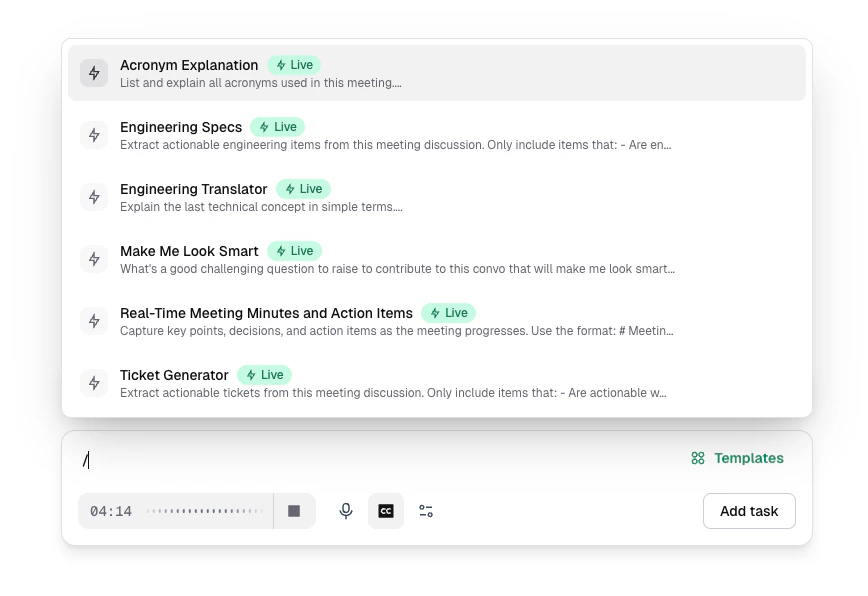
Type / in the prompt bar to filter templates
/ in the prompt bar for instant access to any template without opening the full library. Start typing to filter (for example, /acronym, /ticket, /smart), then press Enter.
This is the fastest way to pull in a live insight mid-conversation without breaking your focus.
Add tasks on the fly
Don’t limit yourself to what you pre-loaded. During the meeting, you can:- Add more templates if the conversation takes an unexpected direction
- Write custom prompts for anything specific: “What are the main risks in the migration plan we just discussed?”
- Use persona templates to get a specific perspective: the Security Sentinel, Devil’s Advocate, or Technical Architect can weigh in on the discussion
Pin important moments
When something lands in the conversation — a decision, a risk, a quote you need later — drop a pin instead of breaking focus to take notes. Earmark captures that moment. When you click a pin to create an artifact, the pinned transcript is appended in Composer so you can refine the prompt before generating.Drop a pin during a live meeting
Ask Chat about the meeting
Click Chat in the meeting header to ask questions while the meeting is live: “What’s being discussed right now?” or “Did this come up in the previous meeting?” Chat reads the conversation so far and can pull in your earlier meetings. See Chat.Pause for decision clarity
Before moving to a new topic, say decisions out loud:- “So we’re going with Option B, the phased rollout. Jane owns the timeline.”
- “We decided to defer the API redesign to next quarter.”
Toward the end
In the last few minutes:- Review your artifacts: check that decisions and action items are captured correctly
- Confirm owners: make sure each action item has a clear owner stated in the transcript
- Add a final prompt if needed: “Summarize the three decisions we made and who owns follow-up”
Everything updates in real time. You don’t need to wait until after the meeting to see your outputs; review them live and course-correct before the call ends.